12 days of OpenAI | Ben's Bites Recap
Live blog of OpenAI's final stretch of launches for 2024.
Published 2024-12-20
Day 12 of OpenAI:
A look at the o3 series of models.
- OpenAI showcased two new models o3 and o3 mini (available early next year).
- In hard technical evaluations, o3 is even better than expert humans.
- o3 mogs the ARC-AGI benchmark, getting 87.5% when given enough compute. The human baseline is 85%.
- o3 mini (at hard & medium thinking) can surpass the current o1's performance.
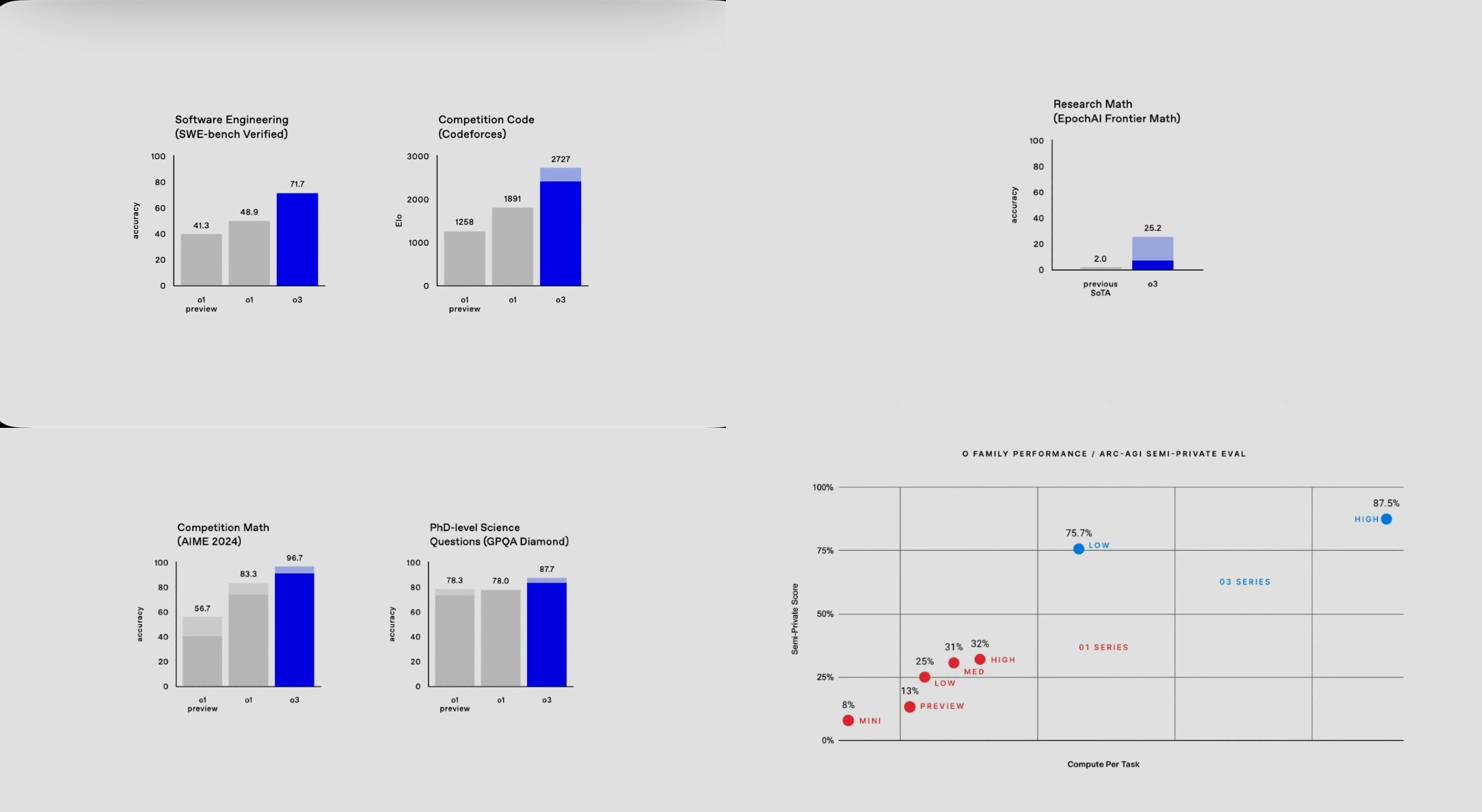
yes OpenAI skipped o2 (because that's already copyrighted). These models are not launching today—OpenAI is calling for public safety testers to apply and test these models before their release to everyone. They have done their own homework (with a new technique called Deliberative Alignment) and now want you to cross check it before they submit it.
o3 and o3-mini seem insane. On the demo, an OpenAI researcher used the o3-mini(in ChatGPT) to code a prompt box, that can interact with o3-mini (in API) and asked it to benchmark itself on GPQA diamond (PhD level science questions). All of this worked smooth and in a single go. This would have taken even serious developers a day or two of work before ChatGPT, a few hours with current models but this was done in minutes.
🍿 Thanks for following along. Catch more of us in our newsletter or on twitter @keshavatearth
Day 11 of OpenAI:
Today's the day for the ChatGPT desktop app. The "work with apps" feature on the desktop app is getting upgrades
For past few weeks ChatGPT have been able to directly interact with apps on your computer (with explicit permission). It already supports major IDEs with more coming to it now. The "working with apps" feature lets ChatGPT "see" what's going on there and help you while being grounded in that context. That also reduces one half of the copy pasting--the inputs, though you still have to export the outputs manually.
- Work with apps now supports three major writing apps: Apple Notes, Notion, and Quip for seamless content creation.
- Option+Space shortcut for instant ChatGPT access and Option+Shift+1 shortcut to instantly pair with frontmost supported app.
- Screen content is accessed through accessibility APIs, giving ChatGPT deeper context than just screenshots.
- These apps now work with existing ChatGPT features - you can use Search for factual verification or Advanced Data Analysis while working with apps.
- Similarly you can also use the o1 models or the Advanced Voice Mode while collaborating with other apps.
Availability:
- Live now on MacOS (requires latest ChatGPT app update)
- Windows version coming soon with similar features
I am a browser human. I don't work with native apps a lot, but this integration makes me wanna switch. If you're already using these, let me know if this is really the quality of life upgrade that I think it is.
Day 10 of OpenAI:
ChatGPT now has a mobile number.
1-800-CHATGPT | 1-800-2428478
In the US, you can call the number and chat in voice mode for up to 15 mins per month, without any internet connection.
For the rest of the world, you can text the number on WhatsApp and get answers (without a ChatGPT account). These queries are handled by the GPT-4o-mini model. (Save the number as +18002428478, sometimes smartphones add your country code by default).
Day 9 of OpenAI:
- o1 is out of preview in the API. It comes with tuneable "reasoning effort" and supports all API features like function calls, structured outputs and vision input.
- Using o1 is cheaper as well because it needs lesser reasoning tokens.
- The input/output token limits for o1 models is now increased to 200k/100k tokens, up from 128k/64k tokens.
- It's currently rolling out to tier 5 developers (who have spent atleast $1000 on OpenAI API).
- Plus, we have some benchmarks for the o1 model.
- Updates to the Realtime API.
- Realtime API now supports WebRTC which allows you to build a smooth audio experience easily.
- GPT-4o-mini can now be used in the realtime API too.
- Realtime API is now cheaper too, with 4o audio tokens being 60% cheaper and 4o mini audio at 10x cheaper.
- New way of fine tuning: Preference Fine-Tuning.
- It trains the model to learn the difference between preferred and non-preferred outputs, which works better to bake in the nuanced preferences.
- This is available today for 4o and coming soon for 4o mini.
- General improvements:
- New developer messages parameter (similar to system messages but higher priority than user's system messages).
- Go and Java SDKs
- Better flow to get API keys
- Talks from the Dev Days in 2024 are up on OpenAI's YouTube
- AMA with API team (catch up here)
Pretty good day for devs.
Day 8 of OpenAI: ChatGPT Search
- ChatGPT Search is now available to all logged in users (free and paid).
- ChatGPT search is faster then before and UI adapts better to the nature of the query. For example, on the web, you see links of websites on top (with little description) to just take you to the website with a detailed answer below that.

- On the mobile, it has a new map UI with list and map view of the places you search for.
- Search is now integrated with voice mode as well. You can get answers from the web even when talking to ChatGPT.
Day 9 is going to be a mini Dev Day, with surprises for developers. 🤞
Day 7 of OpenAI:
Projects: Smart folders for your ChatGPT chats.
- Projects are a way to organize & categorize ChatGPT chats.
- Each project can have its own set of files and custom instructions.
- You can move chats in and out of projects (I've been asking the Claude team to add this for a long time)
EDIT: Deleting Projects deletes the conversations inside them. So, delete with caution.

OpenAI has literally copy pasted the idea from Claude Projects (even the name) but I don't want to complain. Projects are much needed in ChatGPT. ChatGPT is not just a work thing for many of us. I use it for research, coding, brainstorming, grooming advice and more. Just the plain benefit of keeping those chats separate is killer.
Another confession: I have been shy in using custom instructions, because they apply to all chats and not everything needs same type of response. With separate instructions, I'm going to dive more into custom instructions. Lookout for more content on that in our future blogs.
Day 6 of OpenAI
- Advanced voice mode gets "eyes"
- It can use the camera as well as screen share
- Europe again not getting it
- Santa mode for AVM :)
I really like the Santa mode. Using it for the first time resets your AVM limits so you can chat with Santa with a full expressive laugh (though you can continue in standard voice mode). It is going live today.
Camera and Screen Share will rollout to everyone (except friends in Europe) within next week. It works on all devices (mobile, desktop) and web.
Day 5/12 of OpenAI:
ChatGPT x Apple Intelligence:
- Siri can call ChatGPT when it thinks that it needs a smarter AI (coz it can't evolve itself in even 2 years).
- Writing tools in Apple Intelligence can use ChatGPT to write first drafts. (Meh!)
- And ChatGPT can use your device camera to help you (i.e. vision integration is also supported).
Not gonna lie, this was pretty disappointing, not sure if it's worthy as counting a day. The only key launch here is the ease to first message. Instead of opening ChatGPT's desktop app or just type chat.com in your browser, you use Apple Intelligence from your other apps. But hey! what do I know?
...
Actually I do: Google cooked today with a new Gemini 2.0 Flash model (which smokes old and bigger models).
Day 4/12 of OpenAI: Canvas
- no separate model, available to everyone
- run Python code in a canvas. Google Colab for dummies
- Canvas is now supported in Custom GPTs
Canvas comes as the default experience for ChatGPT now. Earlier only ChatGPT could initiate the creation of a canvas, but now you can create a Canvas even before prompting ChatGPT (i.e.) add your content in a canvas and use the canvas as an attachment in the prompt.
Canvas can also run python code now. ChatGPT has always been able to run python code but it was limited in the code interpreter sandbox-with no easy way to make edits to the generated code. But now with Canvas, you can make minor edits and then run the code, ask for bug fixez based on the erors through right within ChatGPT.
And finally, Canvas comes as a tool for custom GPTs. Existing GPTs have it turned off by default, where new GPTs have it turned on. Once enabled, you can trigger canvas by just asking the GPT to use Canvas in its instructions.
Day 3/12 of OpenAI:
Sora is finally here! 🎬 (and it's bonkers—for real)
OpenAI has built a full new product around video generation. It's accessible on sora.com and uses a significantly faster "Turbo" version of the model it showcased in February this year.
Sora comes included with your Plus/Pro sub. No extra charge! 🎉 Quick bits on what you get:
- ChatGPT Plus: 50 videos/month (720p, 5s)
- ChatGPT Pro: 500 priority + unlimited relaxed generations (1080p, 20s)
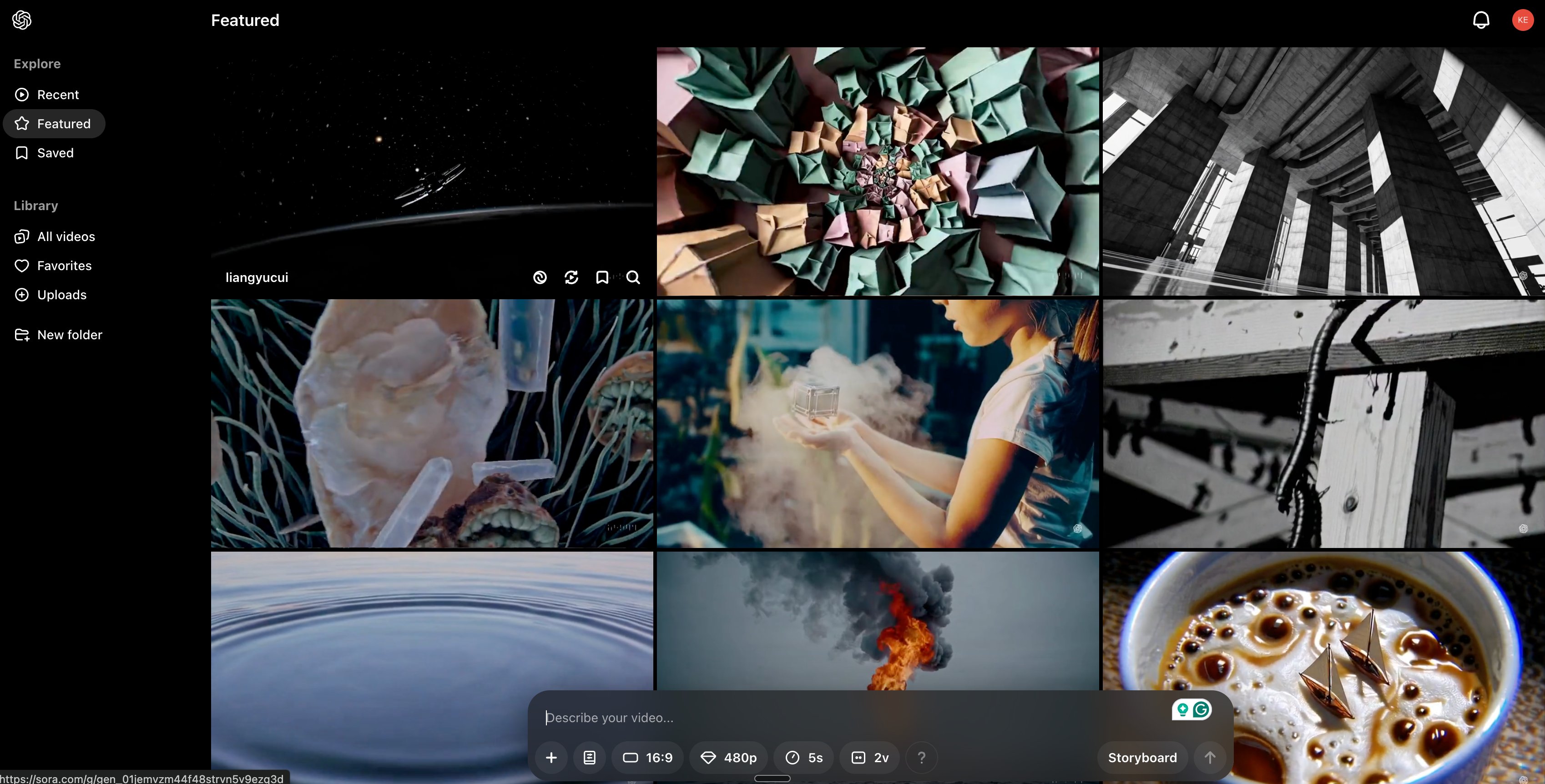
The interface is clean with some neat features:
- Remix existing videos
- Create video variations
- Storyboard tool for frame-by-frame cont
- Square/vertical/landscape aspect ratios
More detailed review coming once we've properly played with it.
Day 2/12 of OpenAI:
The big release for today is "Reinforcement Fine-Tuning".
While that sounds technical and hard, OpenAI just reduced the need of a dedicated AI engineer for making domain-specific models.
RFT takes fine tuning one step further by not just learning from your data, but grading the model to achieve best performance for a certain task. OpenAI's training platfrom makes it as easy as dropping a few files, prepared in a certain format. No need for stumbling around, programming GPUs (believe me when I say it's a torture).
For now, they are expanding the access to this training method with the o1 models in an alpha program with full rollout launch expected in 2025. Again this is not for everyday users, but this is unlocking the power of these current models to an entirely new scale.
Day 1/12 of OpenAI:
- Full o1 model released with image inputs accepted. The new model also has a pro mode which lets it think longer.
- new pricing tier: ChatGPT Pro at $200/m
- o1 replaces o1-preview for Plus users (limited access)
- ChatGPT Pro users will get access to the compute-intensive Pro mode of o1 + unlimited access to all other models.
Hey, OpenAI's first live stream from their 12 days of launches will start soon (at 10 AM PT).
We'll soon have the first set of updates here.
In the meantime, here's our wishlist:
- Full o1 model with access to files, search etc.
- Sora, maybe a faster version called Turbo (with more coming later)
- better memory, canvas, and more tools. 👀 for agents too
- ChatGPT getting ‘eyes’ finally
- More desktop upgrades (their version of MCP)
- Image generation with GPT-4o
- GPT-4.5 (likely not happening)
- something/anything for the GPT store?
Did we miss something? Let us know on Twitter (okay X) - @bentossell and @keshavatearth