A look at ChatGPT’s new search feature
Move over Google: ChatGPT can now search the web in real time.
Published 2025-02-12

Remember when ChatGPT told you its knowledge was limited up until a specific date? Those days are over. OpenAI has finally unleashed live search capabilities in ChatGPT, catching up to competitors like Perplexity and fundamentally changing how we can use the tool.
Let's explore what this means for you.
How to enable search in ChatGPT
First things first: this feature is exclusive to paid ChatGPT subscribers. If you're a subscriber, you'll spot a new search toggle icon in your chat interface - it's available whether you're using the web version, desktop app, or mobile app.

Ready to see it in action? Let's start with a simple prompt:
What's the top business news story in the UK today?

The first thing you’ll notice is how fast it is - fully sourced and summarized answers appear in just a second or two. This is quicker than Perplexity, and far quicker than it takes to pick out this sort of information from a Google search.
Let’s look at a few more use cases.
Using ChatGPT search for real-time market data
ChatGPT now integrates live market data, presenting stock information with clean, context-aware visualizations that make financial data instantly digestible.
How's Apple stock doing?

Using ChatGPT search for location-based services
The new search function handles location queries through two distinct approaches:
- Interactive maps for general area searches (e.g., coffee shops)
- Organized lists for specific service providers (e.g., notary services)
Here’s searching for a morning coffee recommendation:

Here are location recommendations as a list:
Where can I find a notary in Easton, PA?

Using ChatGPT search for technical documentation
Another area in which ChatGPT search excels is breaking down instructional content step by step.
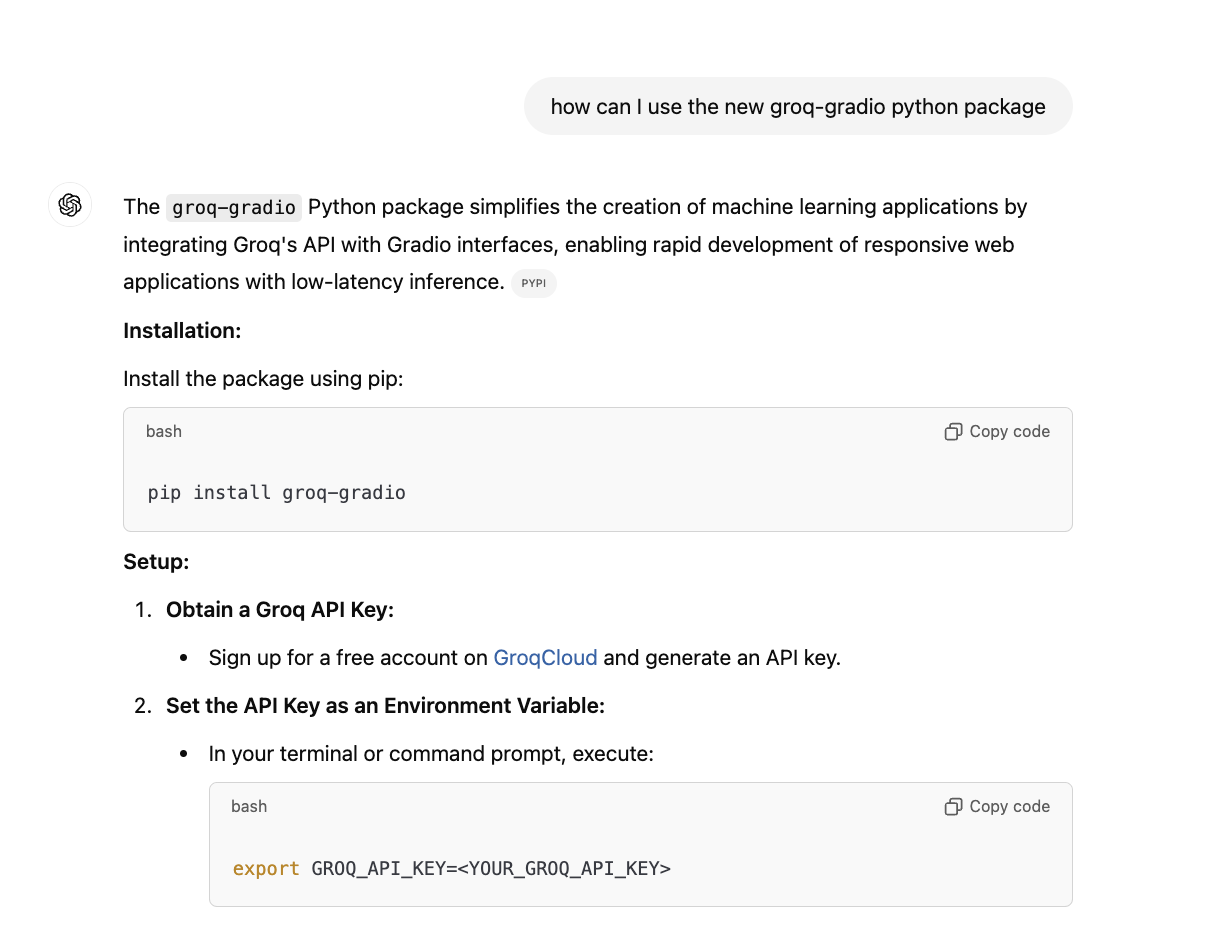
Here I ask a technical question about this python programming package that was released recently:
We've collaborated with @Gradio to create a groq-gradio @PyPi package for you to easily build and ship AI apps with sleek @Gradio web interfaces powered by Groq in just a few lines of code.
— Groq Inc (@GroqInc) October 31, 2024
Check out how you can go from `pip install` to web app here: https://t.co/zujPUb7Adl
It responds with clear instructions and code steps that are ready to copy.
Using ChatGPT search for event discovery and planning
The search feature transforms event planning through:
- Streamlined event listings in an easily scannable format
- Detailed information on specific events
- Comprehensive trip planning capabilities around chosen events
If you ask it to find events for you, you’ll get the results in an easy-to-scan list.

You can then ask for some follow-up information about specific events.

And, if you do decide to attend an event that ChatGPT finds for you, you can ask it to plan your whole trip.

Make ChatGPT your default browser search engine
If this has convinced you to convert to the power of ChatGPT’s search, you’ll be pleased to know that you can make it the default search engine in Chrome.
To do that, first download and install their extension.

Once installed, to start a search, just type your query in the URL par and press enter/return.

A ChatGPT window will open with the response to your query.

This search update transforms ChatGPT from a knowledge-limited AI into a real-time research assistant. For users, this means one less tab to juggle - whether it's checking stocks, finding local services, planning events, or diving into technical documentation, it's now possible to do it all within ChatGPT's familiar interface.
Happy searching!
This post was written by Andrew.