Supercharging Bolt with "Cursor Rules"
Create auto-prompts for building with Bolt and other AI coding tools.
Published 2025-03-31
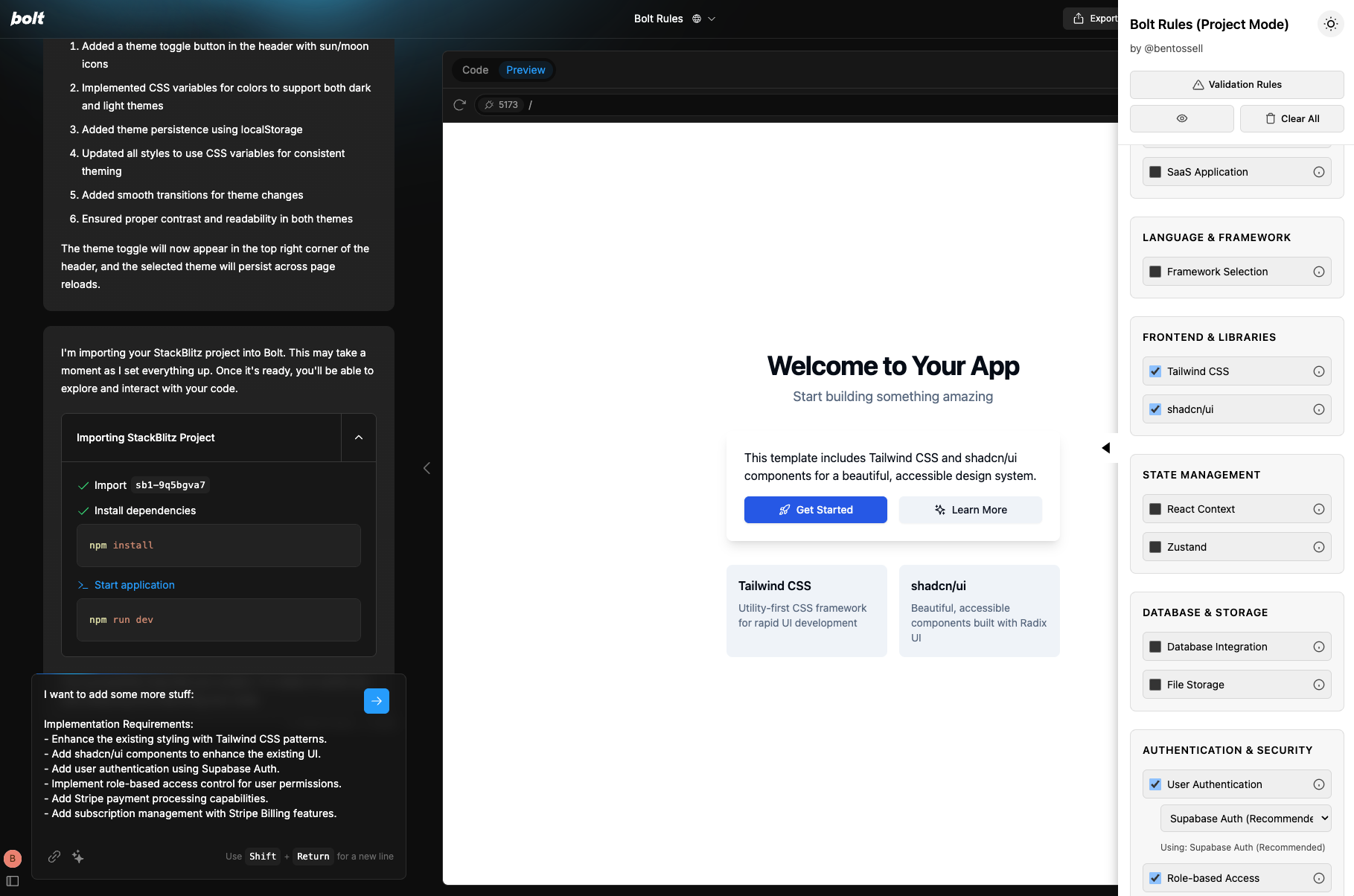
If you've been on X recently, you've probably seen more non-technical founders building their MVPs with AI tools like Bolt. But there's a catch—you still need to know what to ask for.
You may have heard of 'Cursor Rules'—configuration files that customise AI behaviour in the Cursor code editor based on your projects' needs. Developers have these tools to enhance their workflow, but what about the rest of us?
So I thought: what if non-technical founders had their own version of "rules" for AI coding tools?
Which is what I set out to build.
The knowledge gap problem
I love these new tools, but as a builder, I find myself writing "implement authentication with Supabase" or "set up Netlify deployment" over and over. And if you're not technical, how would you even know to specify these details?
You don’t know what you don’t know.
Should you use Firebase or Supabase? Tailwind or Bootstrap? Stripe or Paddle? And what configuration details matter for each?
What you'll learn
In this post, I'll walk you through:
- How I built a Chrome extension that adds a sidebar of options to Bolt
- My process of using Claude to help ideate a new tool
- The challenges I faced and how I solved them (or didn't!)
- How this meta-development approach can help non-technical founders bridge the knowledge gap
- Ways you can use, modify, or be inspired by this tool for your own projects
What the extension actually does
This project wasn't carefully planned from the start. I had a vague idea and just started building, asking Claude for suggestions when I got stuck—a perfect example of "vibe coding" where you're working with AI to explore possibilities rather than following a strict roadmap.
Here's how the process unfolded:
- Initial concept: I started with a basic Chrome extension that could detect when I was on Bolt.new and add a sidebar.
- Feature expansion: I asked Claude for suggestions on what features would be useful, and it recommended front-end frameworks, database options, user authentication, and more.
- Implementation details: For each category, I added dropdowns with popular options (Supabase, Firebase, etc.) and appropriate implementation details.
- Context awareness: I added logic to detect whether I was in a new project or an existing one, and tailored the prompts accordingly.
One incredibly useful terminal command I use often during development was:
npx repomix
This generates a merged representation of the entire codebase, pulling all files into a single document that's easy to share with Claude (or any AI). If you're working with AI assistants on larger projects, this command is gold for getting comprehensive feedback or helping bug fix.
Challenges I faced (and what I learned)
The development process wasn't all smooth sailing.
1. The dreaded scroll issue
My biggest persistent bug was with scrolling in the prompt textbox. When the extension added text to the Bolt prompt area, you couldn't scroll to see all of it—you had to use keyboard arrow keys instead.
This was likely due to z-index issues or event propagation problems. Despite multiple attempts with Claude's help, this remained a stubborn issue that I haven’t fixed - ping me if you know how 😅.
// One attempt at fixing the scroll issue
function fixScrollIssue() {
const promptArea = document.querySelector('.bolt-prompt-textarea');
if (!promptArea) return;
// Make sure our extension elements have lower z-index
const extensionElements = document.querySelectorAll('.bolt-rules-extension *');
extensionElements.forEach(el => {
el.style.zIndex = '999'; // Lower than Bolt's elements });
// Make sure we're not capturing scroll events
const sidebar = document.querySelector('.bolt-rules-sidebar');
sidebar.addEventListener('wheel', (e) => {
e.stopPropagation();
});
}
This illustrates an important lesson: even with AI assistance, technical challenges remain. Sometimes you need to release with known issues and improve iteratively.
2. Different prompt locations
Another challenge was that the prompt textbox appears in different locations depending on whether you're in a new project or an existing one. I had to add logic to detect this and target the correct element:
// Find the appropriate prompt box based on current mode
function findPromptBox() {
const mode = isProjectMode();
if (mode === "setup") {
return document.querySelector('.setup-prompt-area');
} else {
return document.querySelector('.project-prompt-area');
}
}
3. Feature overload
A common trap when building with AI tools is trying to implement too many features at once. I fell into this myself—adding dropdown selectors, template saving, theme toggling, and validation rules all in parallel.
I did this on purpose because it's how I'd naturally build, but it may have led to more bugs and complexity than if I'd focused on one feature at a time.
The lesson: even with AI assistance, following good development practices still matters. Build incrementally and test thoroughly.
Next steps for non-technical founders
If you're a non-technical founder using Bolt or similar AI coding tools, here's how you can benefit from this project:
Use the extension directly
You can check out the project here on Bolt.
Since it's a simple Chrome extension, you can install it by:
- Downloading the code (and unzip the file)
- Going to chrome://extensions
- Enabling Developer Mode
- Clicking "Load unpacked" and selecting the extension folder
Modify it for your needs
The beauty of this tool is its customisability. You can clone the project and:
- Add new technology options specific to your industry
- Customise the implementation details based on your preferences
- Add new categories relevant to your projects
Build your own meta-tools
Even more valuable might be the inspiration to build your own AI-enhancing tools. What repetitive prompts do you find yourself writing? What knowledge gaps do you face?
Some ideas:
- A conversion funnel optimiser that suggests specific code implementations based on common conversion patterns in your industry
- A competitive feature matcher that analyses competitor websites and generates prompts to implement similar capabilities in your own codebase
- A design system translator that takes screenshots of UIs you like and generates the code + prompts needed to implement similar interfaces in your preferred framework
Building better together
This extension represents something bigger than just a convenient tool—it's about finding ways to make AI-assisted development more accessible to everyone, not just developers.
The gap between technical and non-technical founders is narrowing thanks to AI tools, but we still need bridges to cross that final divide. By building tools that enhance AI with domain expertise, we can create those bridges.
Whether you use my extension as is, modify it for your needs, or just take inspiration from the concept, I hope it helps you build better software with less friction and more confidence.
And if you solve that scrolling issue before I do, definitely send me a message. 😉
Happy building!