Craft compelling sales proposals and slide decks
Generate sales proposals and automatically transform them into PowerPoint slides using ChatGPT.
2024-11-13
The sales proposal is a crucial document in the sales process, as it outlines the details of your proposed deal to your target client or customer. Crafting a compelling proposal can make the difference between closing a deal and losing a potential customer.
In this tutorial, you will learn how to:
- Generate persuasive sales proposals
- Highlight the value of your product or service
- Customize proposals for different clients
Step 1: Create your proposal outline
Begin by asking ChatGPT to create an outline for a successful sales proposal.
Prompt:
Create an outline for a successful sales proposal. Once I approve it, I will provide you with details to incorporate into the proposal.


ChatGPT will generate a comprehensive proposal outline, including sections such as an executive summary, problem statement, proposed solution, pricing, and next steps.
Step 2: Provide details about the proposal
Once you see an outline that makes sense for your business, confirm with ChatGPT then proceed to provide more details. To streamline this process, have ChatGPT interview you. You should intentionally limit the number of questions it asks you, otherwise it will likely ask 20+ questions. Start with a few core questions and fill in details after that.
Looks good. Ask me 3 questions I can answer that will give you the information you need to complete the proposal.

Answer the questions with as much detail as you can. If it’s easier, use the dictation feature on ChatGPT so you can simply speak the answers.


Answer the questions with as much detail as possible. If it's easier, use ChatGPT's dictation feature to speak your answers.
Step 3: Generate VBA code for PowerPoint
To turn your proposal into a professional slide deck, ask ChatGPT to generate Visual Basic for Applications (VBA) code for PowerPoint. VBA is a programming language that instructs PowerPoint on how to build slides and populate them with content.
Prompt:
Generate VBA code to create slides for this sales proposal in a PowerPoint presentation. Each section should have its own slide.

ChatGPT will generate the necessary VBA code to create a PowerPoint presentation based on your proposal content.
Step 4: Turn code into PowerPoint slides
Open a new PowerPoint file. Go to Tools > Macro > Visual Basic Editor.

A new window will appear. In the top left corner, find the multi-colored icon. If you hover over it, you’ll see ‘Insert Module.’

Click it to open a new window. Next, copy and paste the code into that window. Finally, press the Play button in the top left corner.
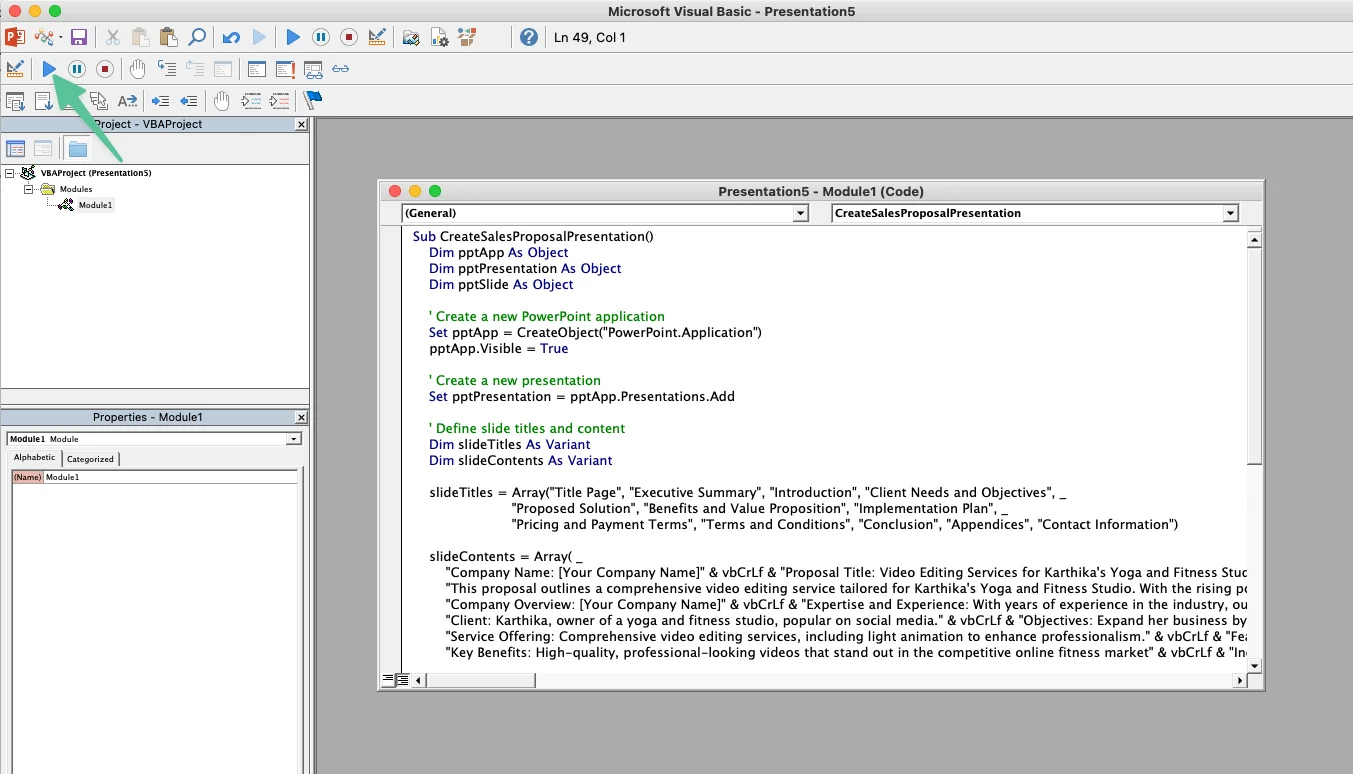
Your code has now been turned into a PowerPoint presentation.

Step 5: Design your proposal
With your presentation created, you can now customize the design to align with your brand. At the top of your presentation, you can click ‘Design’ where you’ll see a variety of templates to choose from. Find the template that fits closest with your brand and manually edit from there.

You can then export the PowerPoint as a PDF, ready to send to your prospect.
Congratulations! By following these steps and leveraging ChatGPT, you can quickly transform your proposal notes into a professionally designed slide deck. This streamlined process will help you create compelling, client-specific sales proposals that highlight the value of your offering and increase your chances of closing deals.
This tutorial was created by Jonah.