Create a musical script and songs
Learn how to create a script outline and songs for a musical.
2024-11-13
Creating a musical theater show requires a detailed and structured approach to ensure a compelling narrative and engaging songs. With some of the newer AI tools, you can supercharge your creativity in creating musicals to help you create a script outline and generate song samples, allowing you to go from idea to draft much quicker.
In this tutorial, we will walk you through the process of:
- Outlining a musical show using Claude
- Crafting lyrics for your musical numbers using Claude
- Then generating song samples with Suno
Step 1: Create a musical outline
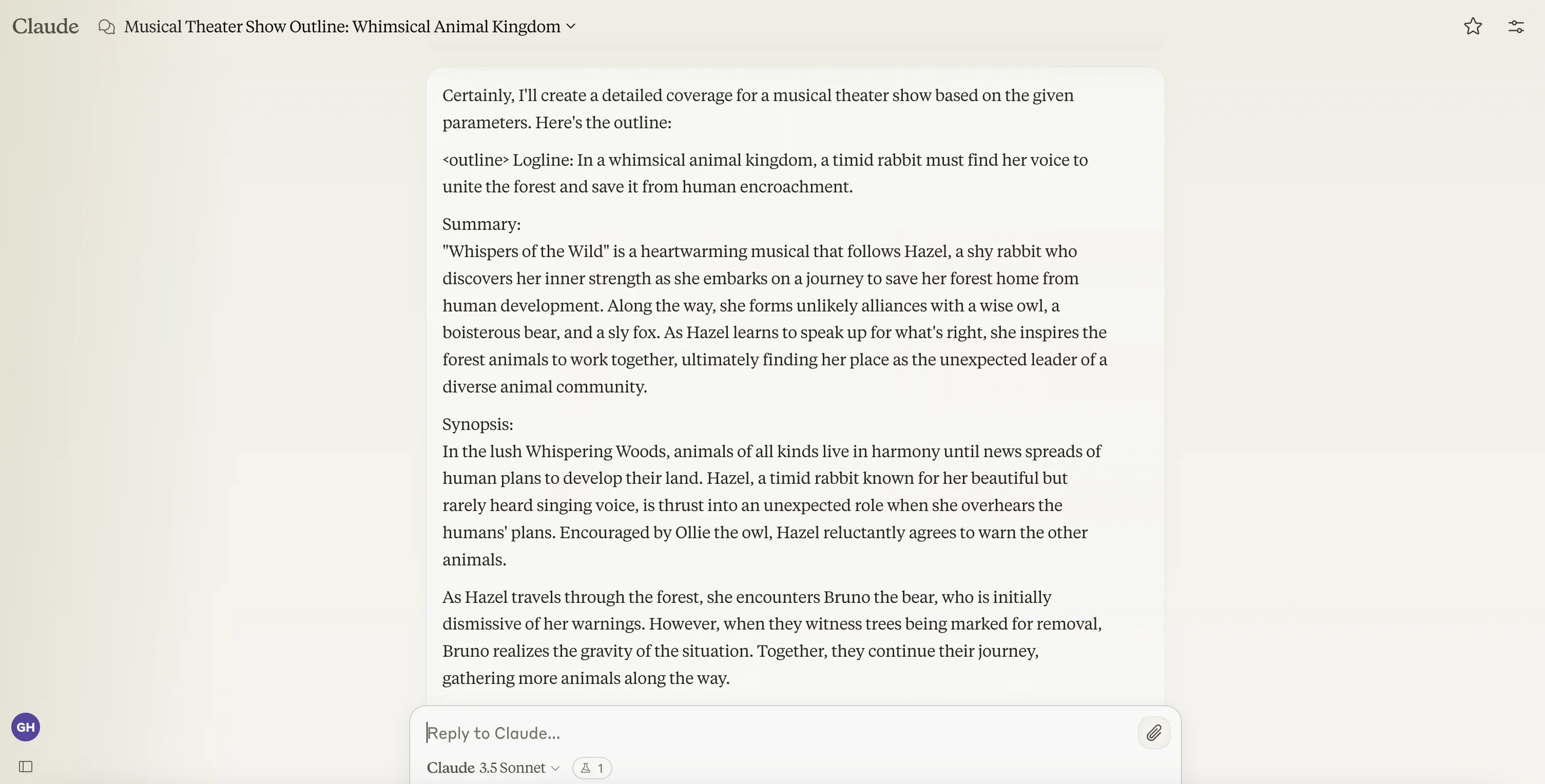
The first step in creating your musical theater show is to outline the entire production. This includes a logline, summary, detailed synopsis, character outlines, song breaks, and song titles. Establishing a clear structure ensures that your story flows smoothly and that each musical number enhances the overall narrative.
To do this, go to Claude and enter the below prompt. Make sure to replace the show theme, number of acts, and number of songs with your requirements. Replace all other info in square brackets to suit your needs.
Sample prompt
You are tasked with creating detailed coverage for a musical theater show, including succinct loglines, descriptive summaries, detailed synopsis, character outlines, song breaks, and song titles. You will be given a theme for the show, the number of acts, and the total number of songs to include.
Here are the inputs you'll be working with:
Show Theme - [insert theme]
Number of Acts - [insert number of acts]
Number of Songs - [insert number of songs]
Guidelines for creating the coverage:
1. Begin with an introduction or opening number.
2. Divide the show into the specified number of acts.
3. Distribute the songs evenly across the acts, with slightly more songs in the first act if the number is odd.
4. Include key plot points or scene descriptions between songs.
5. End with a finale or closing number.
When incorporating song breaks and titles:
1. Create song titles that reflect the theme and plot points of the show.
2. Place songs at crucial moments in the story, such as character introductions, emotional highs and lows, or plot twists.
3. Vary the types of songs (e.g., solo, duet, ensemble) throughout the show.
Present your outline in the following format:
<outline>
Logline:
A succinct one-sentence summary of the show.
Summary:
A descriptive one-paragraph summary of the show.
Synopsis:
Full synopsis of the show.
Characters:
Names and descriptions of all the major characters.
Act 1, Scene 1:
1. Key plot point or scene description
2. [Song Title] - Brief description of the song's purpose or scene
3. Key plot point or scene description
4. [Song Title] - Brief description of the song's purpose or scene
...
Act 2, Scene 6:
1. Key plot point or scene description
2. [Song Title] - Brief description of the song's purpose or scene
3. Key plot point or scene description
4. [Song Title] - Brief description of the song's purpose or scene
...
(Continue for additional acts and scenes if applicable)
</outline>
Here's a brief example to illustrate the format:
<example>
Act 1:
1. [Welcome to Our Town] - Ensemble number introducing the setting and characters
2. The mayor announces an upcoming festival
3. [Festival Preparations] - Upbeat song about townspeople getting ready
4. A mysterious stranger arrives in town
5. [Who Could It Be?] - Curious song about the newcomer
</example>
Remember to tailor the outline to the given show theme, incorporate the specified number of acts and songs, and create a coherent story structure. Be creative with your song titles and plot points while maintaining relevance to the overall theme.
Please provide your complete outline.
.webp)
Step 2: Create song lyrics
Now that you have a detailed outline of your musical theater show, it’s time to create the lyrics for your songs. To do this, we can prompt Claude to generate lyrics for each of our songs. We’ll do this one at a time, per song from the show outline. Make sure to enter your song title and description in the prompt.
Sample prompt:
Based on the show outline, now, you will create lyrics for a specific song in this show. Here are the details:
Song Title: [insert song title]Song Description: [insert song description]
To create the lyrics, follow these guidelines:
1. Consider the tone, style, and themes of the show as described in the outline.
2. Think about the character(s) singing the song and their emotional state or motivation.
3. Ensure the lyrics fit the song's description and its place in the show's narrative.
4. Use rhyme schemes and meter appropriate for musical theater.
5. Include a chorus or refrain that repeats, if appropriate for the song style.
6. Write enough verses to fully express the song's purpose in the show (typically 2-3 verses plus chorus).
When writing your lyrics, follow this structure:
1. Start with a brief explanation of your approach to the song (1-2 sentences).
2. Present the lyrics, clearly marking verses, chorus, and any other sections (e.g., bridge, pre-chorus).
3. End with a short note on how the lyrics connect to the character(s) and the show's themes (1-2 sentences).
Format your response like this:
Lyrics Explanation:
[Your explanation of the approach to the song]
Lyrics:Verse 1:[Verse 1 lyrics]
Chorus:[Chorus lyrics]
Verse 2:[Verse 2 lyrics]
[Additional sections as needed]
Connection Note:
[Your note on how the lyrics connect to the character(s) and show themes]
Remember to stay in character as a musical theater lyricist and ensure your lyrics are consistent with the show outline provided. Be creative, emotive, and true to the musical theater style.
.webp)
.webp)
Now, you can repeat this prompt for each song in the musical to get lyrics for each of the songs from your musical outline.
Step 3: Generate song samples
Now that you have your song lyrics, you can go over to Suno, an AI song generator, to generate song samples for each of your musical’s songs.
To do this, create a free Suno account, then click the “Create” tab in the left-side navigation. Toggle the “Custom” toggle on at the top of the page. This will allow you to add your own lyrics to the song.
In the Lyrics text box, paste in your lyrics from Claude (make sure to remove the section headers like “Verse:”), set the “Style of Music” to musical theater, and add the title of your song. Once all of this is entered, click the “Create” button.
.webp)
Suno will then generate two songs based on the style of music and lyrics you entered. You can click the play button to listen to the songs.
.webp)
And that’s it! With these steps completed, you’ll have the foundations for a musical theater show, from the initial outline to draft musical numbers.
This tutorial was created by Garrett.