Create a privacy policy for your website
Learn how to create a comprehensive privacy policy for your website with ChatGPT.
2024-11-13
In today's digital landscape, a well-crafted privacy policy is more than just a legal requirement—it's a testament to your commitment to user trust and data protection. As your website grows, so does your responsibility to protect user data and maintain transparency.
A thoughtfully crafted privacy policy is your first line of defense in building user trust and complying with data protection laws.
In this tutorial, you will learn how to:
- Use ChatGPT to draft a tailored privacy policy for your website
- Identify key elements to include in your privacy policy
- Ensure your policy is compliant with relevant data protection laws
- Create a user-friendly document that clearly communicates your data practices
Let's create a privacy policy that accurately reflects your business practices and protects both your users and your operations.
Step 1: Identify your data collection points
To create an effective privacy policy, we first need to identify all the points where your website collects user data. This includes both obvious sources like contact forms and less apparent ones such as cookies or analytics tools.
Every website is unique, so we'll tailor this step to your specific practices. Think about all the ways users interact with your site and where you might be gathering information.
Based on my website [your website name], which offers [brief description of your services], list all the data collection points and present in a structured table. Include both obvious and less obvious sources. Here are some examples from my website: [list 3-5 specific examples].
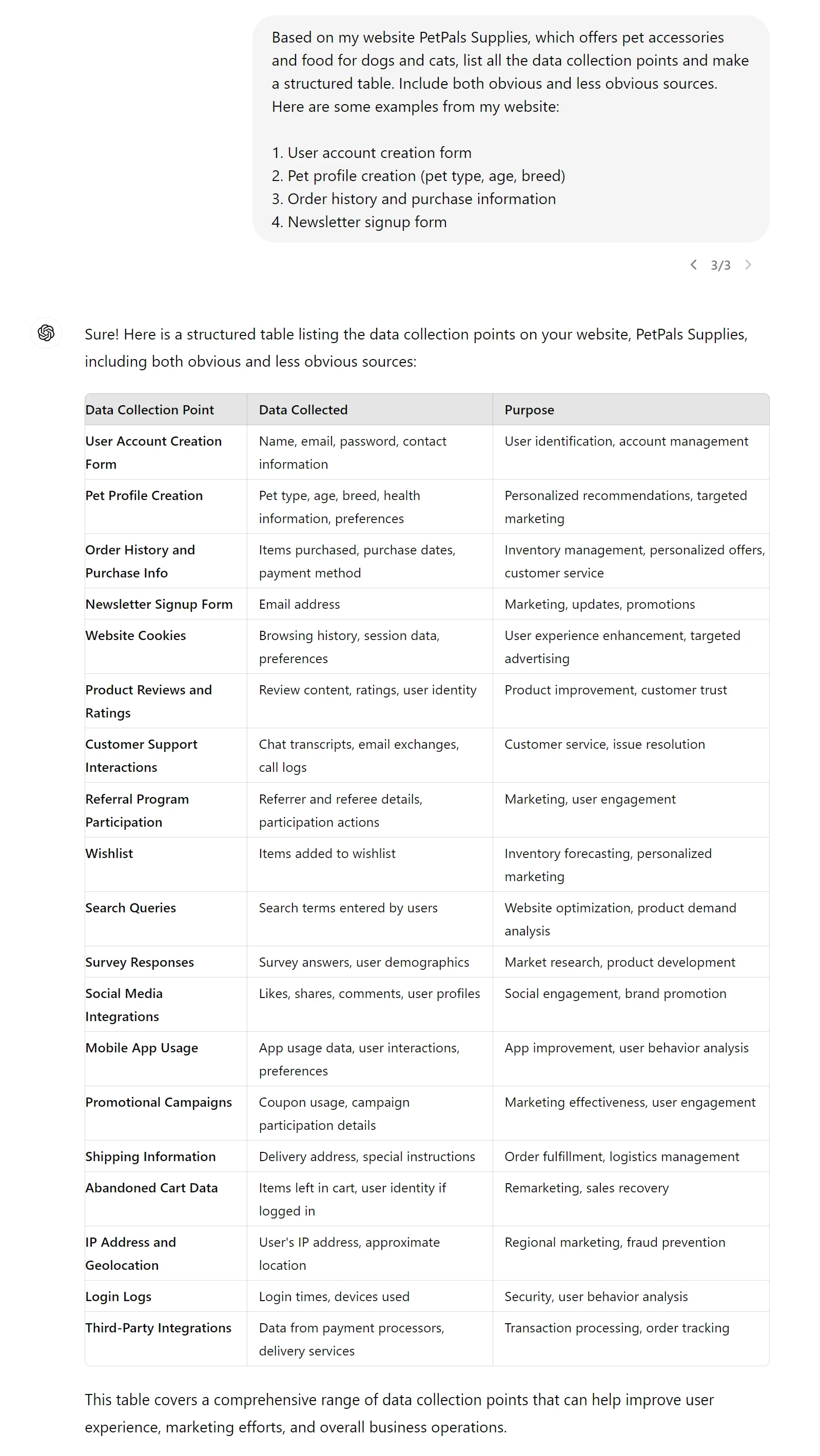
Review the list carefully and add any missing points unique to your website. This overview will form the foundation of your privacy policy.
Step 2: Define your data processing and storage
Now, let's explain how you handle the collected information. This step is crucial for transparency and compliance with data protection regulations.
For my website [your website name], we process and store data in the following ways: [list 2-3 specific examples]. Based on this information and the data collection points identified earlier, outline how we should process and store data. Include standard data retention periods and any third-party services we use, such as [name 1-2 third-party services you use].
.webp)
.webp)
Step 3: Describe your user consent and transparency measures
Now that we've identified our data collection points and processing methods, it's time to focus on how we obtain user consent and maintain transparency. This step is crucial for building trust with your users and complying with data protection regulations.
Think about how you currently inform users about data collection on your website. Do you use cookie banners? Pop-ups? Checkboxes on forms? Consider the different types of data you collect and how you might need separate consent for each type.
Let's use AI to help us draft clear statements about our consent and transparency practices. Here's a prompt you can use:
Based on the following consent and transparency practices for my website:
1. Consent mechanisms: [List your mechanisms]
2. Data categories: [List your categories]
3. User information methods: [List your methods]
Please draft clear statements explaining how we obtain user consent and maintain transparency. Include specific examples of how these mechanisms work on our site.
.webp)
.webp)
After you receive the ChatGPT's response, take some time to review and customize the statements. Make sure they accurately reflect your practices and are easy for your users to understand.
Step 4: Implement data security measures
With user consent taken care of, let's move on to explaining how we protect the data we collect. This section of your privacy policy should reassure users that their information is safe with you.
Think about the security measures you have in place. Do you use encryption? How do you control access to user data? How often do you conduct security audits? Don't worry if you're not sure about all the technical details - we'll use AI to help us explain these in user-friendly terms.
Here's a prompt to help you draft this section:
Given the following security measures for our website:
1. Encryption: [Your encryption methods]
2. Access controls: [Your access control measures]
3. Security audits: [Your audit frequency]
4. Employee training: [Your training practices]
5. Incident response: [Your response plans]
Please draft a paragraph explaining these measures in user-friendly language for our privacy policy. Focus on reassuring users about data protection without revealing sensitive technical details.
.webp)
Once you have the ChatGPT-generated paragraph, review it carefully. Make sure it accurately reflects your actual practices and adjust the language as needed. Remember, we want to reassure users without giving away too much technical information that could potentially be misused.
Step 5: Include user rights and data control
Next, we'll outline the rights users have regarding their personal data on your website. This is particularly important for compliance with regulations like GDPR or CCPA.
Think about what rights you provide to your users. Can they access their data? Can they request corrections or deletions? How about opting out of certain types of data processing? Consider how users can exercise these rights on your website.
Let's use AI to help us draft this section:
Based on the following user rights we provide:
[List the rights you offer from the above list]
And considering our process for handling user requests:
1. Contact method: [Your preferred contact method]
2. Response time: [Your typical response time]
3. Verification process: [How you verify user identity]
Please draft a section for our privacy policy that outlines these user rights. Include clear instructions on how users can exercise these rights and explain any limitations or exceptions that may apply.
.webp)
.webp)
Step 6: Draft the complete privacy policy
In this final step, we'll use AI to compile all the information we've gathered into a complete privacy policy. This will include the data collection points, processing methods, consent mechanisms, security measures, and user rights we've discussed in previous steps.
Here's the prompt to use:
Using all the information we've identified in the previous steps, please create a comprehensive privacy policy for our website. Ensure that the policy complies with relevant data protection laws in [your country], including [specific regulations if applicable].
Structure the policy in a clear, user-friendly format with appropriate headings and subheadings. Include any necessary legal disclaimers and contact information for data protection inquiries.
.webp)
.webp)
.webp)
Congratulations!! By following this tutorial, you've used AI to help draft key sections of your policy, including user consent, data security, and user rights. You've learned how to provide clear prompts to get relevant, tailored content for your website.
Remember, while AI has helped streamline the process, it's crucial to review the generated policy carefully. Make sure it accurately reflects your actual practices and consider having a legal professional review it for compliance. This policy is an important step in building trust with your users and protecting your business.
This tutorial was created by Tanmay.