Enhancing personal productivity with Copilot
Unlock greater productivity by leveraging Microsoft Copilot as your personal AI assistant.
2024-12-06
This tutorial is part three of our “Learn how to use Microsoft Copilot” course. We’ll be diving into all things personal productivity with the AI assistant.
In this tutorial we'll cover:
- What can Microsoft Copilot be used for?
- The basics of prompting Copilot
- How to use Copilot as a personal assistant for a range of tasks
What can Microsoft Copilot be used for?
Microsoft Copilot is much more than just a question-answering tool or a homework helper. It's like having a super-powered personal assistant to help you with a wide range of tasks, big and small.
When you start using Copilot, you'll see suggested prompts that can inspire you and showcase the types of tasks Copilot can handle well. These might include drafting emails, summarizing documents, analyzing data, browsing the web, and more.
Prompting basics for Microsoft Copilot
The queries and requests you send to Copilot are called prompts. Prompts work best when they're descriptive and context-rich. Remember, you're communicating with an AI assistant that's integrated into your work environment.
When prompting Copilot, imagine you're talking to a knowledgeable colleague who has access to your current document or data.
Here are some tips for effective prompting:
- Be clear and specific: The clearer your instructions, the better Copilot can assist you. Instead of asking "Summarize this," try "Summarize the key points of this sales report in bullet points, focusing on Q2 performance."
- Guide Copilot: Provide direction on what you want to achieve. For instance, in PowerPoint, instead of saying "Make a presentation," try "Create a 5-slide presentation on our Q3 marketing strategy, using our company's blue and white color scheme."
- Provide context: Copilot can see the content you're working with, but additional context can be helpful. In Outlook, you might say, "Draft a follow-up email to the budget meeting we had yesterday, asking for approval on the revised figures in the attached spreadsheet."
We'll dive deeper into advanced prompting techniques later in the course.
Microsoft Copilot as a personal assistant
Copilot isn't just for work-related tasks. It can assist you with a wide range of personal productivity tasks across various Microsoft applications. Let's explore some examples:
Writing every day
Copilot is a helpful writing assistant. It can help you find the right words to craft thoughtful messages, be creative in your birthday wishes, or create entire stories from a single idea.
Here are a few examples of how to use Copilot in your day-to-day writing. We’ve included the prompt text so you can copy/paste it into Copilot yourself.
Creating custom birthday wishes
My friend Sarah loves puns, cheesy jokes, and gardening. Can you help me write a funny birthday message for her that includes those things?

Nailing the tone of your message
I have to finish this work project for next week and I can only choose one: the party or the project on the weekend. How do I decline a party invite but not sound arrogant?

Creating night-time stories for kids
Tell me a very long story about the daily life of a robot puppy that does all the housework, can talk etc. Use positive themes that will make it feel normal to my 3-year-old kid.

Planning everyday tasks
Meal planning, vacation planning, day-to-day scheduling… We all know how much smoother life goes when there’s a plan in place. But who has the time to do all this planning? You! With Copilot by your side, you can plan anything, from daily tasks to large-scale trips and events.
Thanks to its ability to understand language, Copilot can handle your custom requests and constraints, beyond templates and standard responses you usually find on the web.
Meal planning
Guide me in planning meals for an entire week, for 2 adults and 2 kids aged 6 and 8. We like healthy food with lots of vegetables and fruits and little to no dairy. Include where possible how we might use leftovers the next day, if there are any.

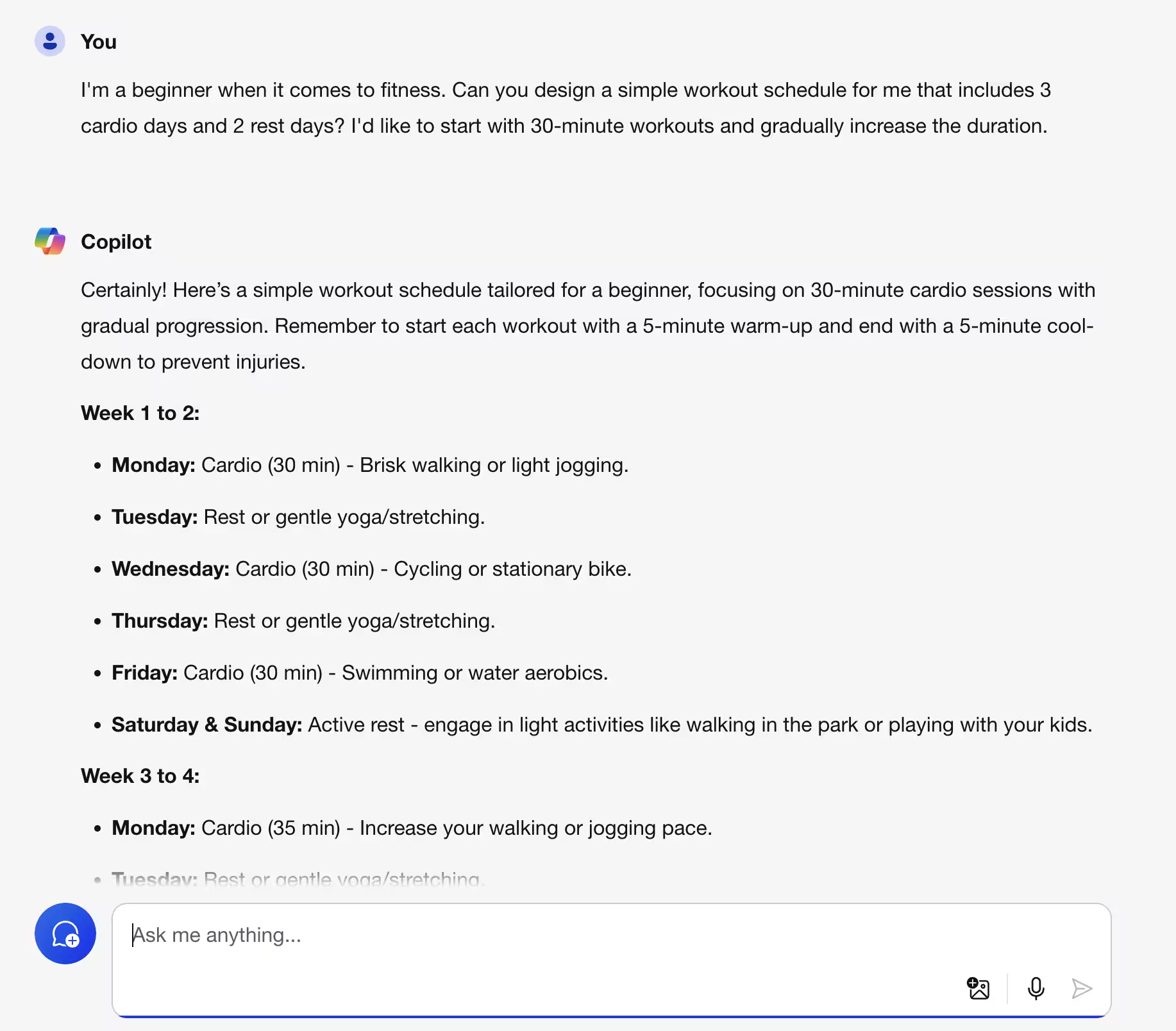
Planning a beginner fitness schedule
I'm a beginner when it comes to fitness. Can you design a simple workout schedule for me that includes 3 cardio days and 2 rest days? I'd like to start with 30-minute workouts and gradually increase the duration.
Summarizing lengthy articles
Don’t have the time to read every word of that 3,000-word article? Copilot’s great at finding the key takeaways from a lengthy piece of writing and summarizing them in your preferred format.
Summarize this article as detailed bullet points: [insert article text]


Asking elaborate questions
Bing search is good for answering simple queries, but when you have an elaborate query or multiple questions linked to each other, you need something better. Something like Copilot.
What are Bouclé Sofas? Why are their prices higher than regular sofas?

Getting custom recommendations
Since Copilot has been trained on a massive amount of data, including comments/reviews on the web on just about everything, you can use it to discover new things you might love.
I love classic sci-fi movies but I'm looking for something more obscure. Can you recommend a few hidden gems from the 70s or 80s?

Translation and language learning
Copilot knows multiple languages and can translate content between them.
I'm travelling to Paris next month. Can you teach me a few basic phrases in French, like how to order coffee or ask for directions?

You can also follow up with a further prompt, and Copilot will understand it in the context of your previous question:
That's helpful. Can you suggest any videos for pronunciation? Or apps? Not Duolingo, please.

Getting familiar with Microsoft Copilot
Now it's your turn! Think of five tasks where Copilot could be your helpful assistant. These could be related to your work, personal projects, or just exploring Copilot's capabilities. Here are some ideas to get you started:
- Ask Copilot to help you create grocery lists based on your favorite recipes.
- Ask for a summary of a long email thread you’ve been copied into discussing a trip with your friends, and if there are tasks you’re meant to do.
- Have Copilot explain the best way to stop a young puppy jumping up at visitors, and offer a 4-week training plan.
For each task, write at least one prompt you could give Copilot. Try to follow the tips we've given you throughout this tutorial. Enjoy exploring the possibilities!
In the next tutorial, we'll dive into the Copilot mobile app to uncover additional use cases for using Copilot for personal productivity.
This tutorial was created by Garrett.