How to use AI to prepare for a job interview
Elevate your interview skills using AI as your personal interview coach.
2024-11-13
This tutorial is designed for anyone preparing to interview for a job. The prompts provided in this tutorial can be altered and adjusted based on the type of role you’re seeking. For the purpose of this tutorial, we’ll use a product manager role.
In this tutorial, we’ll cover:
- How to research potential questions you may encounter in your interview
- How to structure concise and impactful answers
- How to use ChatGPT to practice and get feedback
Priming ChatGPT
Before asking any questions, give ChatGPT context. Attach your resume as a PDF.
Here’s a prompt you can use:
You’re helping me prepare for an interview. I have included the job description below and attached my resume. We’re going to go through a variety of exercises and prompts. Once you have reviewed the job description and my resume, reply with “ready.”
Job Title: [title]
Job Summary:[detailed summary of the role]
Responsibilities:[expected responsibilities]
Qualifications:[desired qualifications]
Skills:[desired skills]
This role is ideal for a strategic thinker with a passion for technology and product innovation.
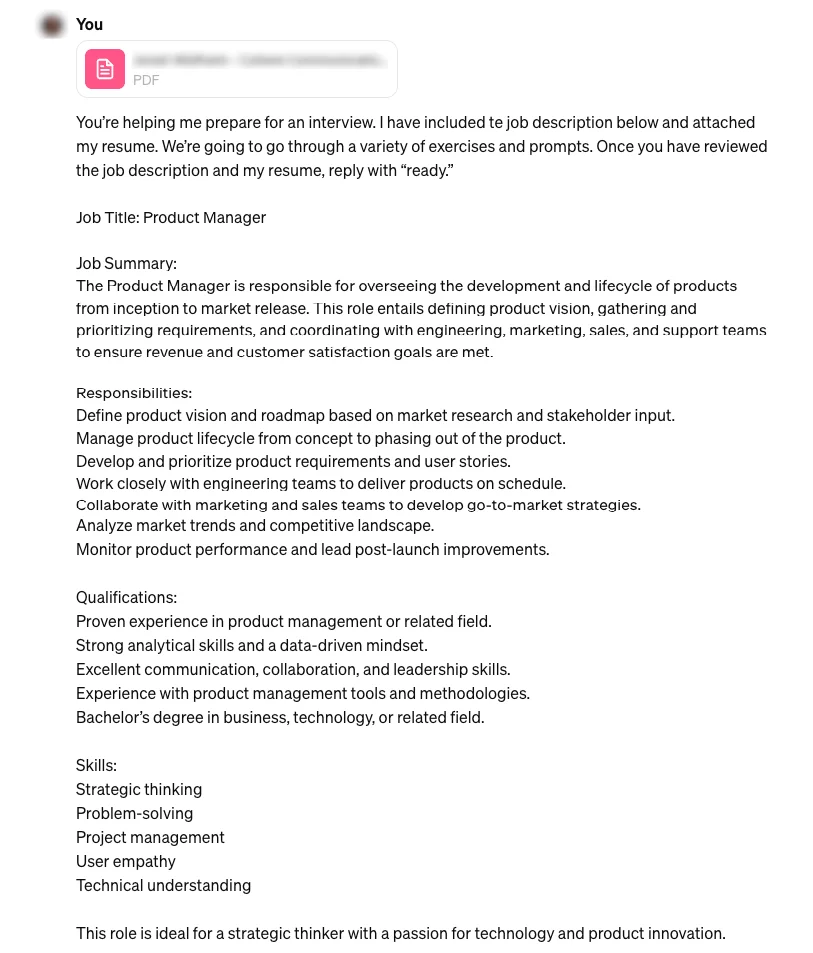
Sometimes when you give ChatGPT a lot of information at once, it becomes verbose and off-track. Telling ChatGPT how to reply, e.g. “reply with “ready””, is an easy way to avoid that.
Potential questions
The first thing ChatGPT is going to offer us is some insight into the type of questions you might get. The key here is to prompt ChatGPT for two sets of questions. One set will be from a recruiter or screener who doesn’t necessarily have subject matter expertise. The next set of questions should be framed coming from a discipline leader.
What are some questions a recruiter might ask me? Separately, what are some times the head of product might ask?
Make the questions a mix of styles, from hypothetical situations to explaining processes.
You’ll receive an answer that looks something like this:
.webp)
These questions offer you a great starting point. While you can dive deeper into every question, you should identify the questions you feel are most relevant and that you need to work on.
Diving deeper into specific questions
Here are two examples of how to dig into specific questions. Note: some of the identifying details from the examples below were blurred out for the sake of this tutorial.
In Recruiter question #1, “tell me about yourself,” what are the most important elements of a strong answer? Take into consideration the job description I shared and details in my resume.
.webp)
OK, the scripted answer ChatGPT provided feels a bit generic. But the structural elements included in the “tailored approach” are great: professional background, skills & competencies, unique value proposition, personal motivation, and cultural fit. You can use this to make sure your answer includes your unique perspective and experience, and how it can benefit the company you’re interviewing with.
ChatGPT excels at highlighting the question behind the question. So let’s use it to explore a question focused on subject matter expertise.
Let's go back to the original list of questions you generated. For question #5 from the head of product, what is the interviewer looking for in a question like this?
.webp)
ChatGPT suggests 6 elements you could incorporate into your answer. Alternatively, you may want to tell a more compelling story that strongly emphasizes just one or two of these elements.
Craft more impactful answers
As we’ve already seen, ChatGPT generates relatively generic answers to interview questions. But it’s an excellent editor. If you give ChatGPT a rough draft of your answer, it can add structure and a strong narrative.
The following is an example of a dictated answer so it includes umms and ahhs.
I just recorded my answer to the question: “[insert question]”
How can I make the following answer more concise and insightful?
Answer: [insert answer transcript]
.webp)
Not only does ChatGPT tighten up the language and presentation, but it provides a framework you can apply to other answers as well.
Practice interview questions with ChatGPT
Along with sharing written or previously dictated questions, you can also have a real-time conversation with ChatGPT. This feature is available exclusively on OpenAI’s ChatGPT app.
.webp)
.webp)
Once you click the headphones in the bottom right corner, a dictation screen will appear with simple instructions. Say the following prompt:
We're going to do some practice questions, so you're going to ask me some questions about being a product manager for this company, and I'm going to answer them. After that, you're going to give me critique and feedback on my answer.
.webp)
The feedback you receive from one or two practice answers will be incredibly valuable in structuring other answers in your interview.
Keep in mind that ChatGPT is not an expert in your life or field. The most valuable elements to using ChatGPT for interview preparation are the potential questions you might face, and the appropriate structures and frameworks to help you deliver exceptional answers.
Good luck with the interview!
This tutorial was created by Jonah.