Integrating with sales team workflows, nurturing leads, and closing deals
Seamlessly integrate AI-powered processes with sales team workflows to nurture leads and close deals.
2024-12-20
Welcome to the fifth tutorial in our Building an AI-powered sales funnel course!
Converting your outreach campaigns into actual sales requires seamless coordination between your prospecting tools and your sales team's workflow. When your sales reps cannot easily access prospect engagement data or receive timely notifications about interested leads, valuable opportunities slip through the cracks.
In this tutorial, you will learn how to:
- Export and sync Reply.io engagement data
- Implement a lead-scoring system
- Create automated workflows for high-value lead follow-ups
- Set up nurture campaigns for leads
- Develop a strategic approach to closing deals
Let’s dive in!
Exporting and syncing data
To integrate our workflow with the sales team, we will begin by exporting our database of contacts along with their email engagement data from Reply.io. This data includes valuable engagement metrics such as email clicks and opt-outs.
By analyzing this engagement data, we can implement lead scoring in HubSpot and concentrate our efforts on high-value leads that have demonstrated interest.
Let's begin with the Reply.io integration. Navigate to the execution tab in your Reply.io dashboard and locate the integrations section.

This is where we manage all external app integrations with Reply.io.
When you access the integrations page, you'll notice multiple options for syncing Reply.io and HubSpot data. For our purpose, we'll focus on two key synchronizations:
- Syncing people in Reply with contacts in HubSpot
- Syncing people's statuses from Reply with lead status in HubSpot
Start by opening the people sync option in Reply.io. The system shows two pre-mapped fields by default. Click on "add field mapping" to include additional fields you want to sync with HubSpot. This includes all the data we previously exported from Clay.com into Reply.io, ensuring our sales representatives have complete context about each lead.

Next, let's configure the people statuses sync. This involves mapping engagement data like bounced emails, clicks, contacts, completion status, and invalid emails. All these status fields from Reply.io can be synced with HubSpot for lead scoring purposes. Remember to create new custom properties in HubSpot's settings menu for any lead statuses that don't already exist, setting their type as lead status.

After configuring both synchronization steps, enable the complete sync using the toggle in the top right corner.

Understanding and implementing lead scoring
Lead scoring is a way to rank potential customers based on how valuable they are to your business. It involves giving points for various actions and traits that show a prospect's interest and suitability for your product or service. When a prospect meets the criteria for enough points, they are considered qualified leads that your sales team should focus on right away.
In our context, we'll use the engagement data we've synced from Reply.io to create a meaningful scoring system in HubSpot. This helps your sales team prioritize their efforts on prospects who are most likely to convert.
Let's first understand what makes a good lead scoring model. We want to track both explicit and implicit indicators of interest. Explicit indicators come from direct actions like email replies, while implicit indicators include behaviors like email opens and link clicks.
Navigate to HubSpot's settings page and click on Properties in the left sidebar.

Look for the HubSpot score property–this is where we'll build our scoring system.
For our Reply.io campaign engagement, here is our initial scoring framework for positive and negative criteria:
- Link clicked: +5 points
- Replied: +10 points
- Meeting booked: +20 points
- Opted out: -20 points

Click on Save, and the lead scores will be calculated automatically for all the prospects.
As you gather more data about what indicates a qualified lead for your business, you can adjust these scores. For instance, if you notice that prospects who click links convert at a higher rate than those who merely open emails, you might increase the points for link clicks.
Aligning with sales activities
With our scoring system in place, we need to create automated workflows that turn these scores into actionable tasks for our sales team.
Navigate to Automation > Workflows in your HubSpot dashboard. Click the "Create workflow" button in the top right corner.
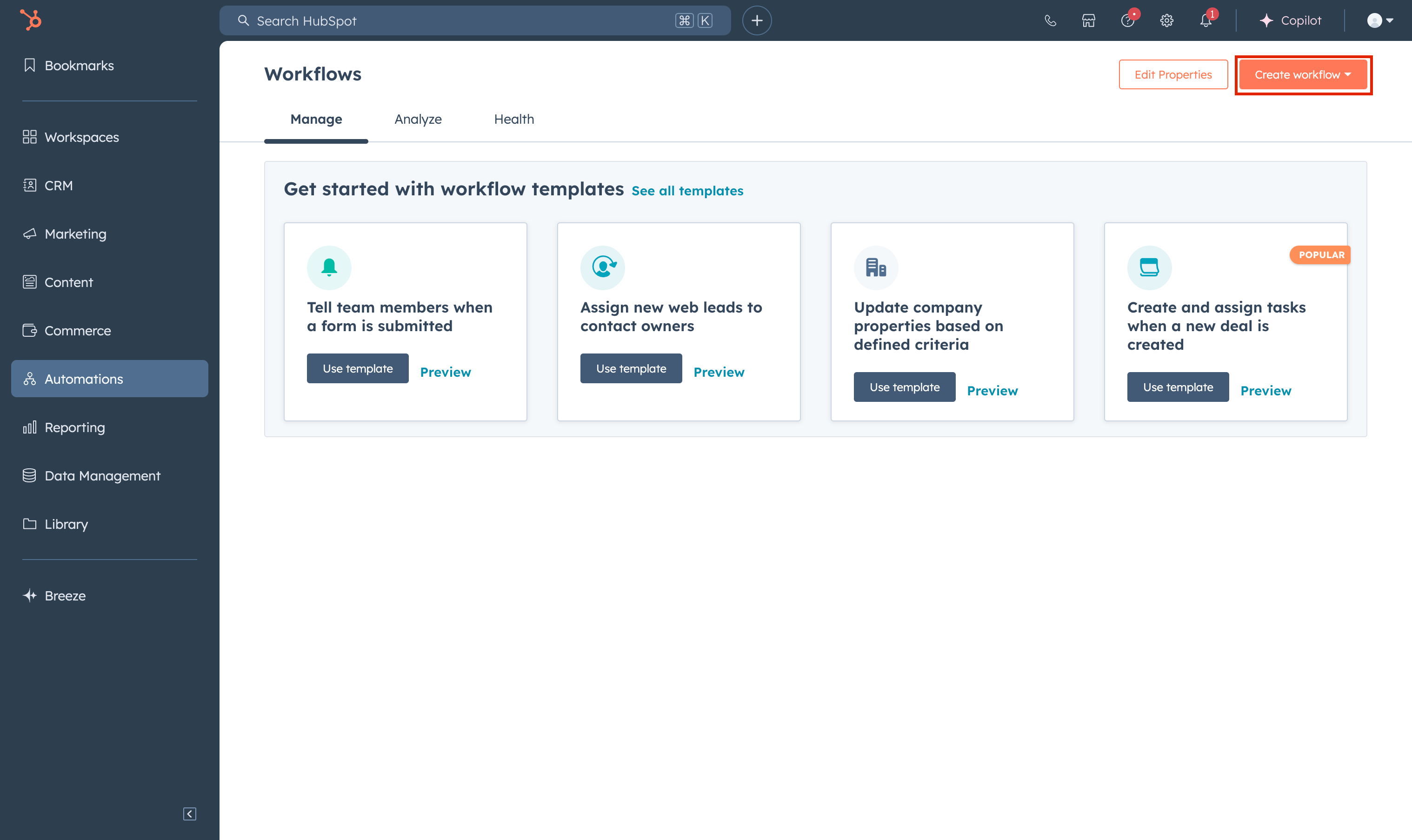
You'll see several workflow types—select "Contact-based" since we're working with contact properties and scores.
Name your workflow "High-Value Lead Follow-up". Now we'll set up the enrollment trigger that determines when contacts enter this workflow.

Click "Set up triggers" and select "When filter criteria is met" as your trigger type. Find the "HubSpot Score" property we just created and set the condition to "is greater than 15". This threshold identifies prospects showing significant engagement with our outreach.

Save the trigger step, click "Add action," and select "Create task" from the actions menu. We will create a task that notifies a sales representative when a high-value lead is identified.
You can also assign tasks in other project management apps, such as Asana or Notion.
In the task creation form:
- Set the task title to "Follow up with high-value prospect from Reply.io campaign"
- Select the task type
- Set the task due date to "2 days after enrollment"
- Assign the task to the contact owner or a specific sales rep

Click “Review and publish” to enable the workflow. Now we’ve successfully set up the automation to automatically identify engaged leads and inform our sales rep of the same.
Nurturing your leads
After setting up our workflow in HubSpot that creates tasks for high-scoring leads, we need a strategic approach to nurture leads who haven't fully engaged yet.
Create a new sequence specifically for nurture campaigns. This sequence should differ from your initial outreach by focusing on value delivery based on the engagement patterns we've observed. For instance, if certain links or topics garnered more clicks in your first campaign, build your nurture messages around these themes to maintain momentum.
Training your sales team to effectively use these new tools is crucial. Schedule a brief training session to show them how to interpret Reply.io's engagement metrics and use them in their follow-up strategies. This helps bridge the gap between automated outreach and personal touch points.
Consider grouping your leads into different nurture sequences based on their engagement levels. Those who opened but didn't click might need more compelling content, while those who clicked but didn't reply might benefit from a more direct value proposition or a different approach to demonstrating ROI.
Strategic approach to closing deals
While our automated systems handle lead scoring and task creation, closing deals requires a strategic human touch that leverages all the data we've gathered. This is where we'll make the most of our AI insights during negotiations.
Start by examining the engagement data from both Reply.io and HubSpot before any sales conversation. Look for patterns in how prospects have interacted with your content—which features drew their attention, what pain points resonated most, and when they typically engage with your communications. This intelligence helps shape your negotiation strategy.
Create a pre-call ritual that includes reviewing:
- Complete engagement timeline
- Specific content interactions
- Response patterns and timing
- Common objections from similar prospects
When reaching out to high-scoring leads, reference their specific interactions with your campaigns. If they've consistently engaged with content about particular features or benefits, make these the centerpiece of your conversation. This demonstrates attentiveness and helps personalize your approach.
This integration of nurturing through Reply.io and data-informed human interaction creates a powerful system for moving leads through your pipeline effectively. You're not just following up— you're continuing a conversation that's already shown promise through measurable engagement.
For deeper insights into your cold outreach campaign performance, navigate to the Reports section and download your campaign report.
You can perform a comprehensive analysis of this data using tools like ChatGPT or Claude. Use these prompts to extract meaningful insights from your reports:
Campaign overview
Analyze the uploaded campaign report and provide:
1. A summary of the key metrics (delivery, open, and reply rates)
2. How these numbers compare to industry standards
3. The most notable strengths and areas for improvement
Engagement analysis
Based on these campaign metrics, identify:
1. The effectiveness of our outreach (looking at open-to-reply ratio)
2. Any concerning metrics that need immediate attention
3. Specific suggestions to improve engagement rates
Conversion metrics
Using this campaign data, analyze:
1. The conversion rate from total emails to meetings booked
2. Whether our interested response rate aligns with industry standards
3. Recommendations for improving conversion rates
When you’re done with this setup, move on to the next and final tutorial of this course for monitoring and improving your sales pipeline.
This tutorial was created by Tanmay.