Optimize sales territory assignments
Maximize revenue by analyzing sales data and optimizing territory assignments with ChatGPT.
2024-12-20
Manually analyzing sales data to optimize territories is not only labor-intensive but also susceptible to oversight. Now, with ChatGPT's advanced analytical capabilities, you can streamline this process, making data-driven decisions with ease.
In this tutorial, you will learn how to:
- Gather and prepare your sales data for analysis
- Visualize your sales data using ChatGPT
- Identify key performance indicators (KPIs) relevant to your business
- Analyze current territory performance based on these KPIs
- Generate data-driven recommendations for territory optimization
- Simulate and forecast the impact of proposed changes
Let’s dive in.
Step 1: Gather your sales data
The foundation of effective territory optimization is robust sales data. Your goal here is to compile your historical sales data into a CSV file. This data should ideally include:
- Sales figures
- Customer information
- Product or service categories
- Current territory assignments
- Dates of sales
Don't stress if your data isn't perfect or if you don't have years of history. ChatGPT is incredibly adaptable even with limited data. It can provide valuable insights to guide your territory optimization efforts.
Once you've prepared your CSV file, it's time to let ChatGPT analyze it. Upload your CSV file and use the following prompt:
Analyze the attached sales data CSV file and provide a summary including:
1. Total sales volume
2. Number of unique sales reps (if applicable)
3. Number of unique customers
4. Top 3 product categories by sales
5. Any notable patterns or trends
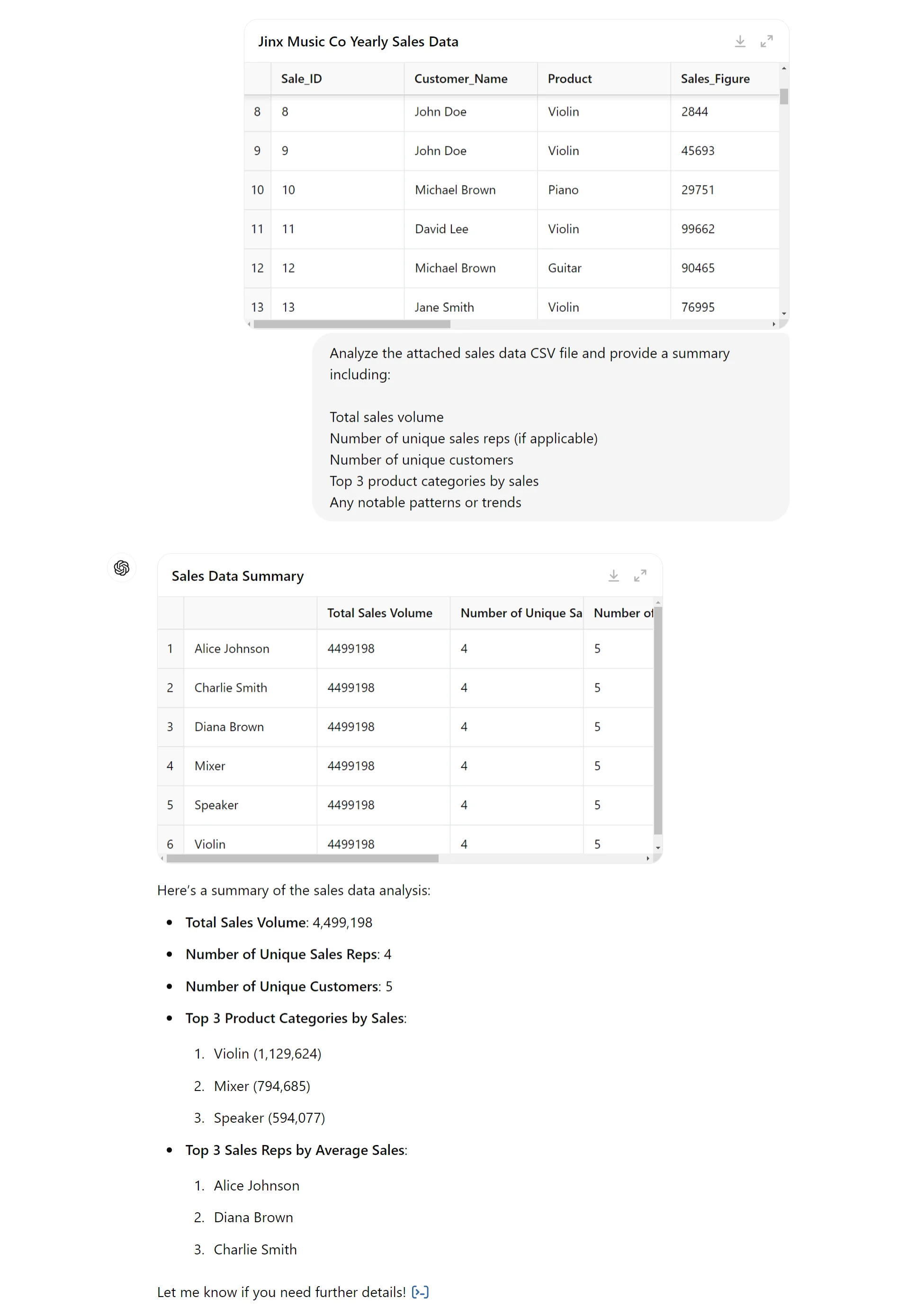
This initial analysis serves two crucial purposes. First, it gives ChatGPT an overview of your sales landscape, setting the stage for deeper insights. Second, it provides you with a high-level summary of your data, allowing you to quickly spot any glaring issues or unexpected trends.
Step 2: Visualize your sales data
Numbers alone can sometimes obscure important patterns and relationships in your data. That's where data visualization comes in. By transforming your sales data into visual representations, you can uncover insights that might otherwise remain hidden.
ChatGPT can help you create these visualizations directly. Use the following prompt to generate visualizations:
Based on the sales data analysis, create the following visualizations:
1. A bar chart showing sales performance by territory
2. A pie chart illustrating the distribution of sales across product categories
3. A line graph tracking sales trends over time
4. A scatter plot comparing the number of customers to total sales for each territory
For each visualization, provide the chart as an image and explain the key insights it reveals about our sales performance and territory effectiveness.
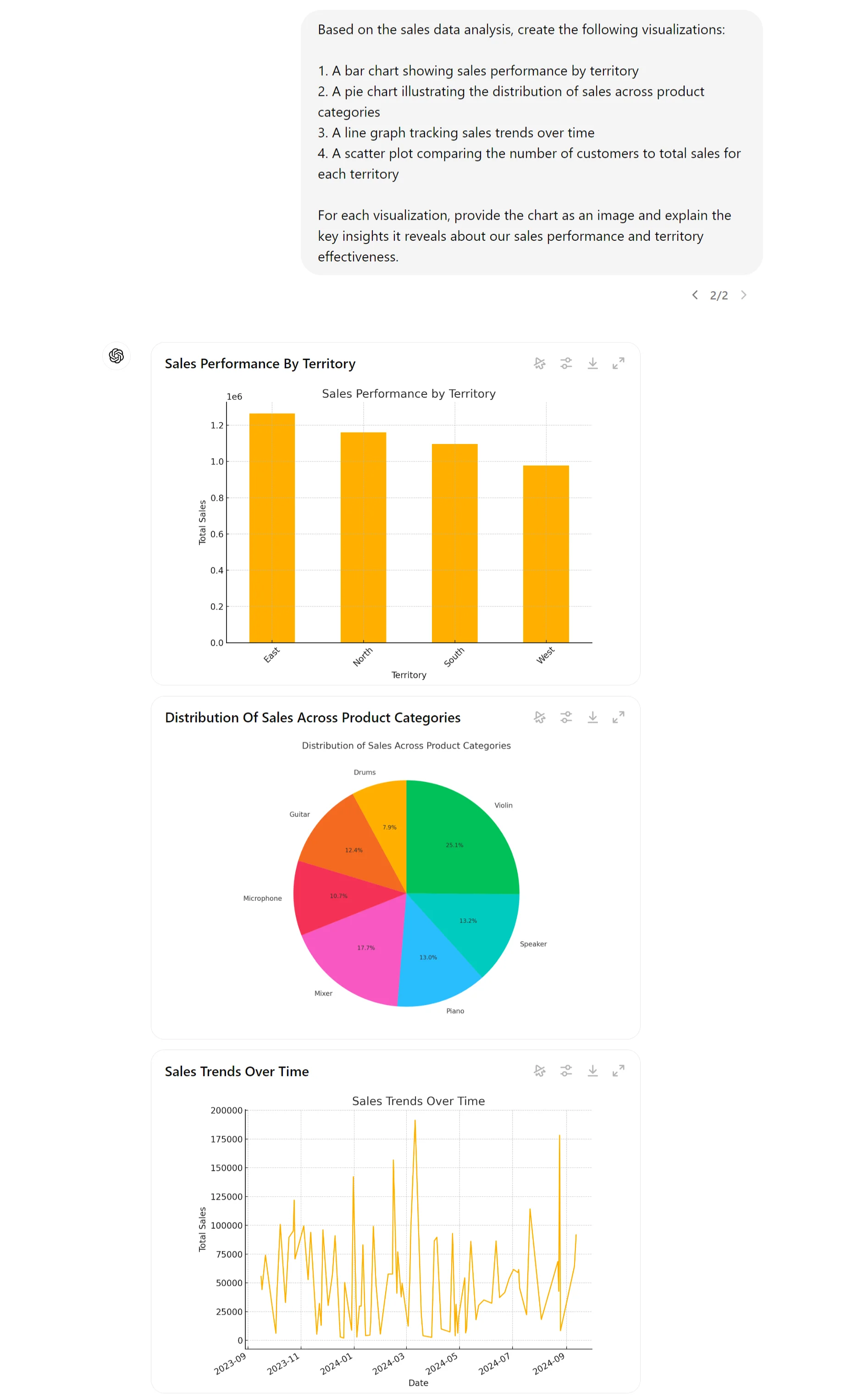
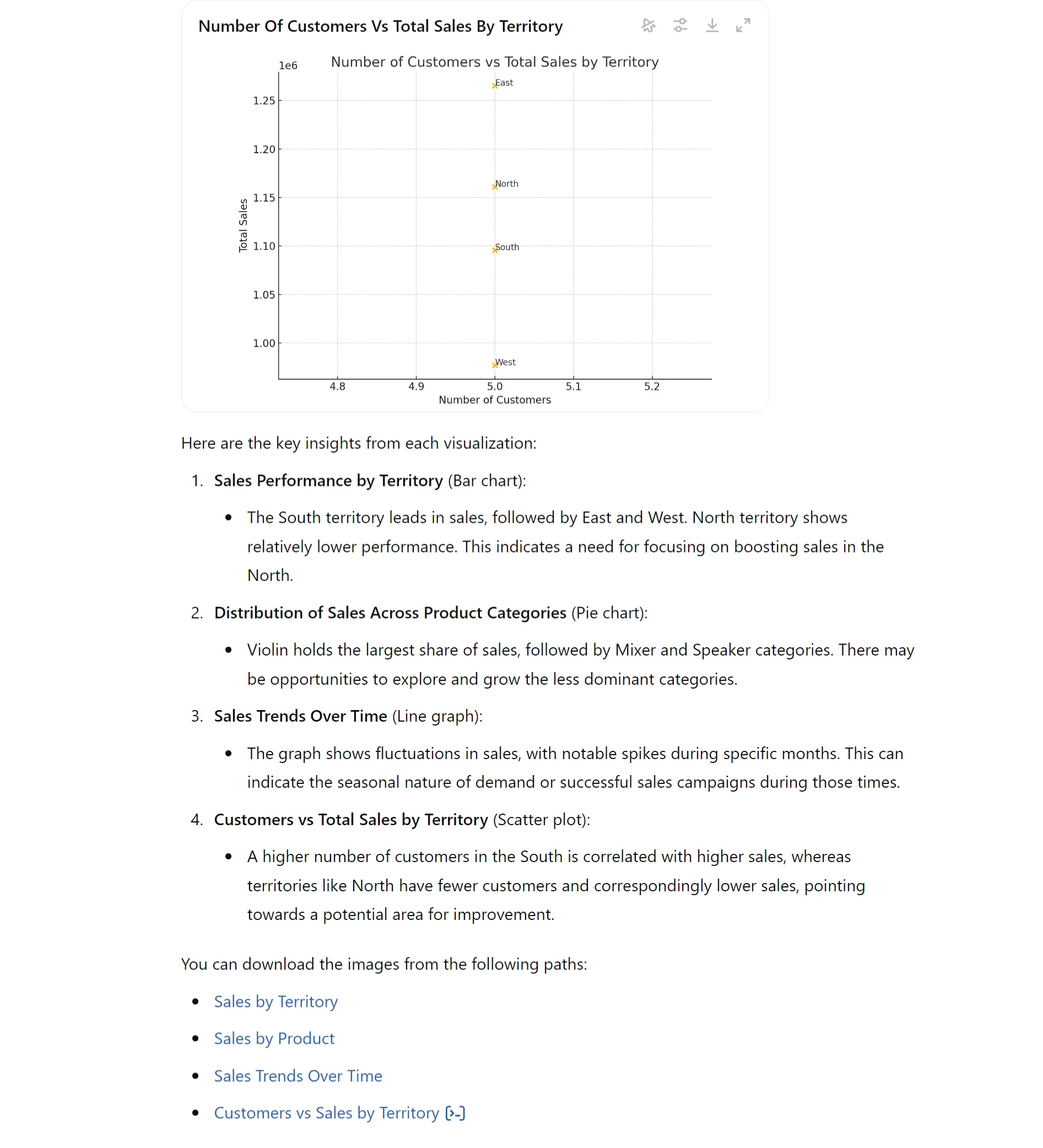
These visualizations will provide a powerful complement to the numerical analysis. Take time to study these visualizations carefully as they're powerful tools that can guide your optimization strategy and help you communicate your findings to stakeholders.
Step 3: Identify key performance indicators (KPIs)
With a clear picture of your data in hand, both numerically and visually, it's time to determine the metrics that truly matter for your business. This step is crucial because the KPIs you choose will drive your entire optimization strategy.
Here's where ChatGPT's analytical power really shines. Use this prompt to generate the KPI suggestions:
Based on the sales data analysis and visualizations, suggest 5-7 key performance indicators (KPIs) for optimizing sales territory assignments. For each KPI:
1. Explain its importance
2. Describe how to calculate it from our dataset
3. Suggest how it could influence territory decisions
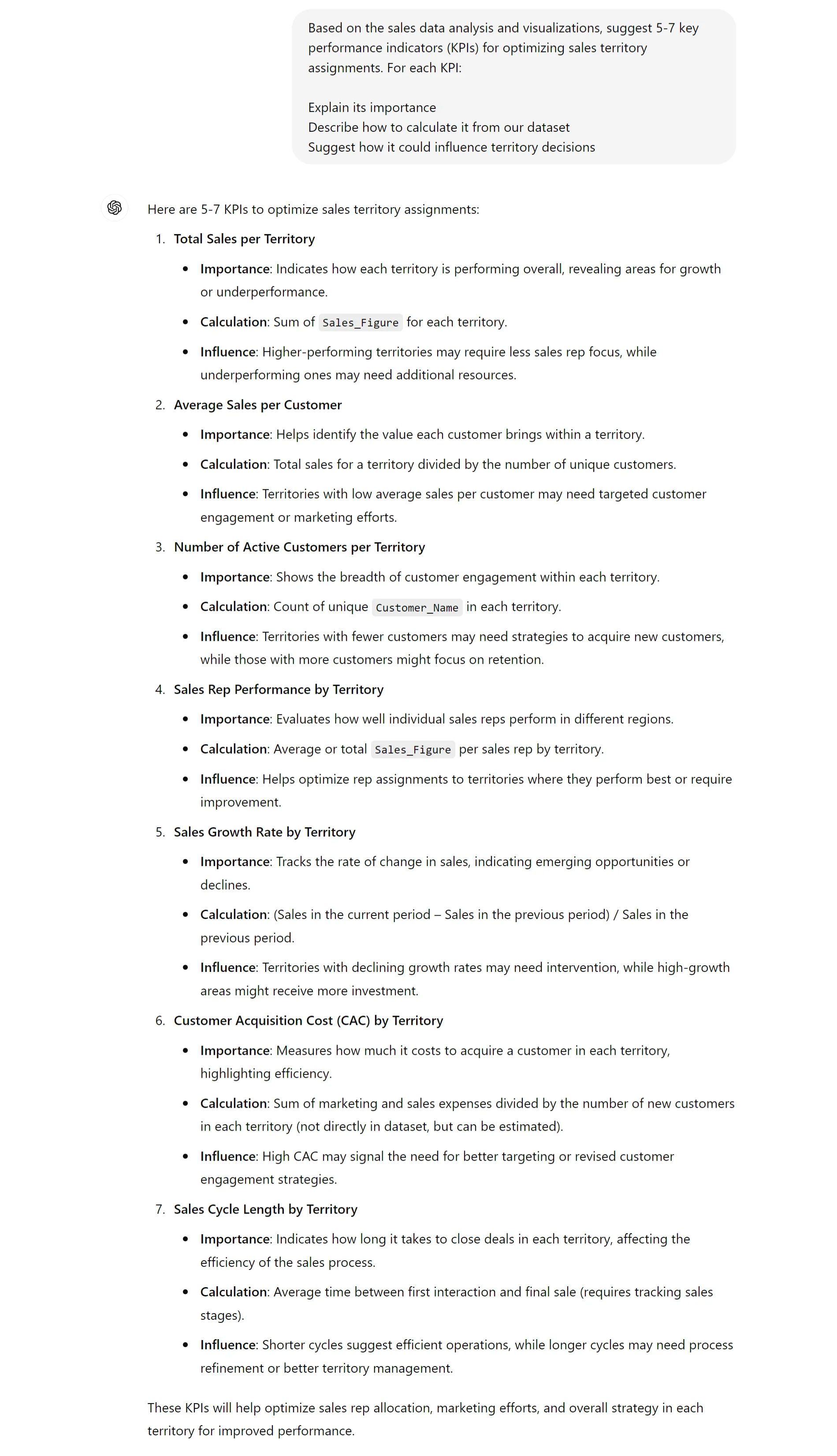
ChatGPT will provide a list of KPIs tailored to your specific data and industry. These might include metrics like revenue per territory, customer acquisition cost, average deal size, or customer lifetime value.
Step 4: Analyze current territory performance
Now that you've identified your key metrics, it's time to put them to work. This step involves a deep dive into your current territory setup to uncover opportunities for improvement.
Use this prompt for a comprehensive territory analysis:
Analyze the performance of our current sales territories based on the identified KPIs. Provide:
1. A ranking of territories by overall performance
2. Key strengths of the top-performing territory
3. Areas for improvement in the bottom-performing territory
4. Notable patterns or trends across territories
5. Factors contributing to performance differences (e.g., geographic size, customer density, industry mix)
Present this information in a clear, structured format.
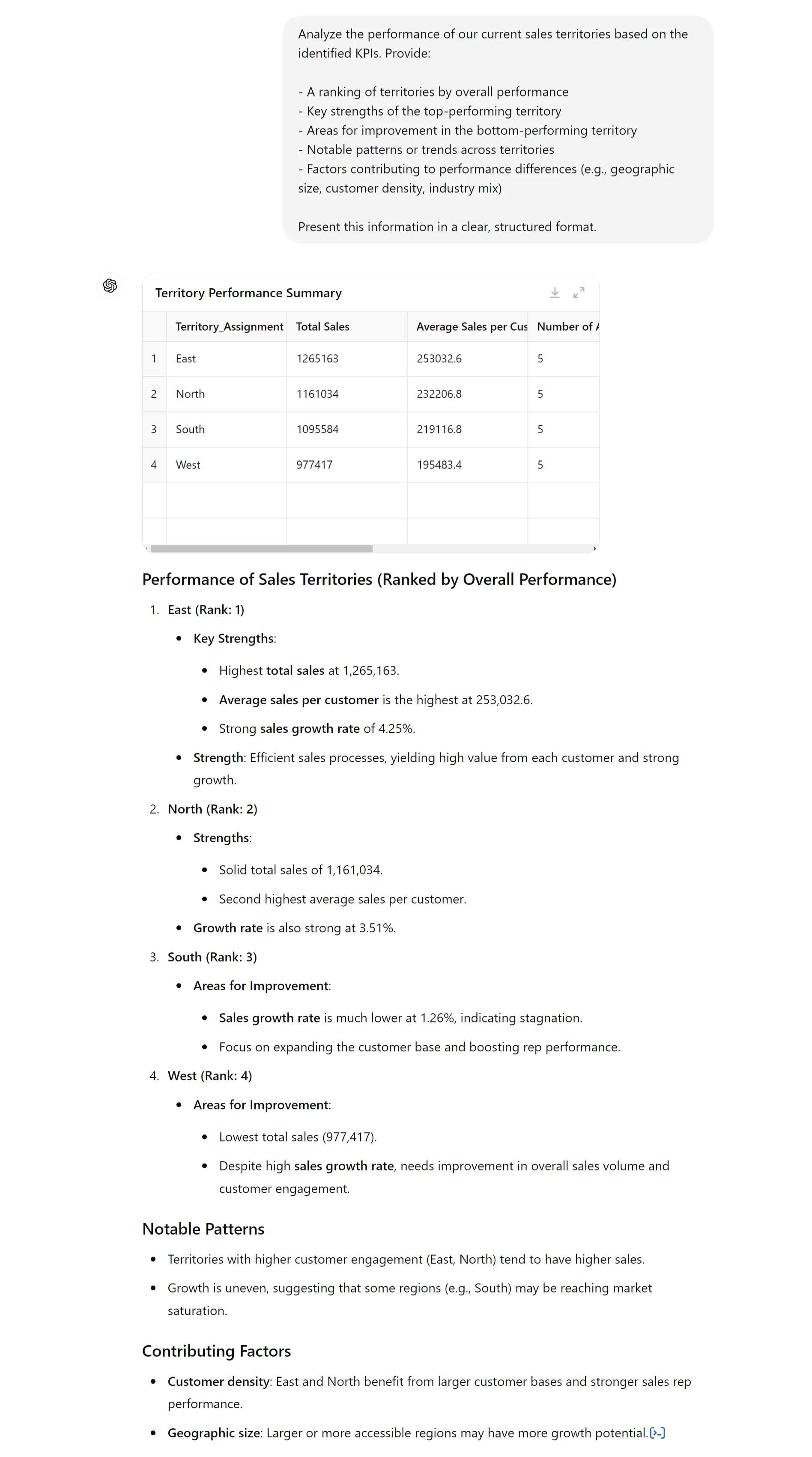
The ranking of territories gives you a clear picture of where your strengths and weaknesses lie. Pay close attention to the top and bottom performers. What makes the best territory successful? Is it a particularly skilled sales rep, a high concentration of ideal customers, or perhaps a perfect balance of products?
Step 5: Generate optimization recommendations
Armed with a deep understanding of your current performance, it's time to leverage ChatGPT for data-driven optimization recommendations. This is where the AI's analytical capabilities really shine, providing insights that can transform your sales strategy.
Use this prompt to get tailored suggestions:
Based on the territory performance analysis, provide recommendations for optimizing sales territory assignments. Consider:
1. Workload and opportunity balance across sales reps
2. Geographic clustering of customers
3. Industry specialization of reps or territories
4. Historical performance patterns
5. Growth potential in underserved areas
Provide 3-5 specific, actionable recommendations for territory reassignment or adjustment. For each, explain the rationale and expected benefits.
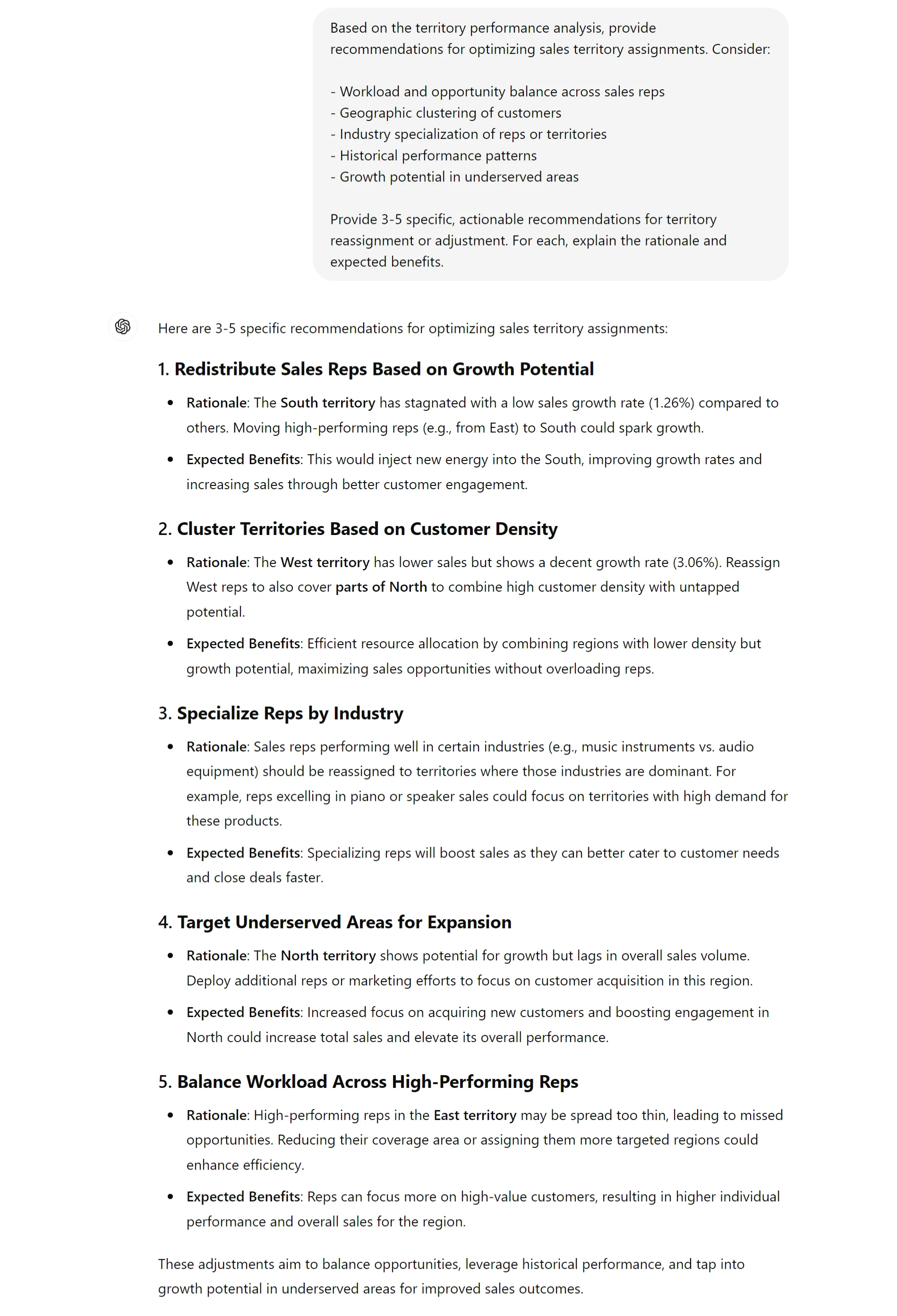
ChatGPT will analyze all the data and insights gathered so far to generate strategic recommendations. These aren't just generic suggestions – they're tailored specifically to your business based on your data, KPIs, and current performance.
Step 6: Simulate and forecast impact
Before diving into implementation, it's crucial to understand the potential outcomes of your optimization strategy. This allows you to test your plans in a risk-free virtual environment and forecast the results and other impacts it may have.
Use this prompt to get a detailed forecast:
Simulate the potential impact of the proposed optimization recommendations on overall sales performance. Include:
1. Estimated increase in total sales (provide a range if uncertain)
2. Identification of any territories that might see decreased performance, with explanations
3. Suggestions for fine-tuning the optimization plan based on simulation results
4. Timeline for expected results (short-term vs. long-term impacts)
Present the results clearly, highlighting the most significant potential impacts.
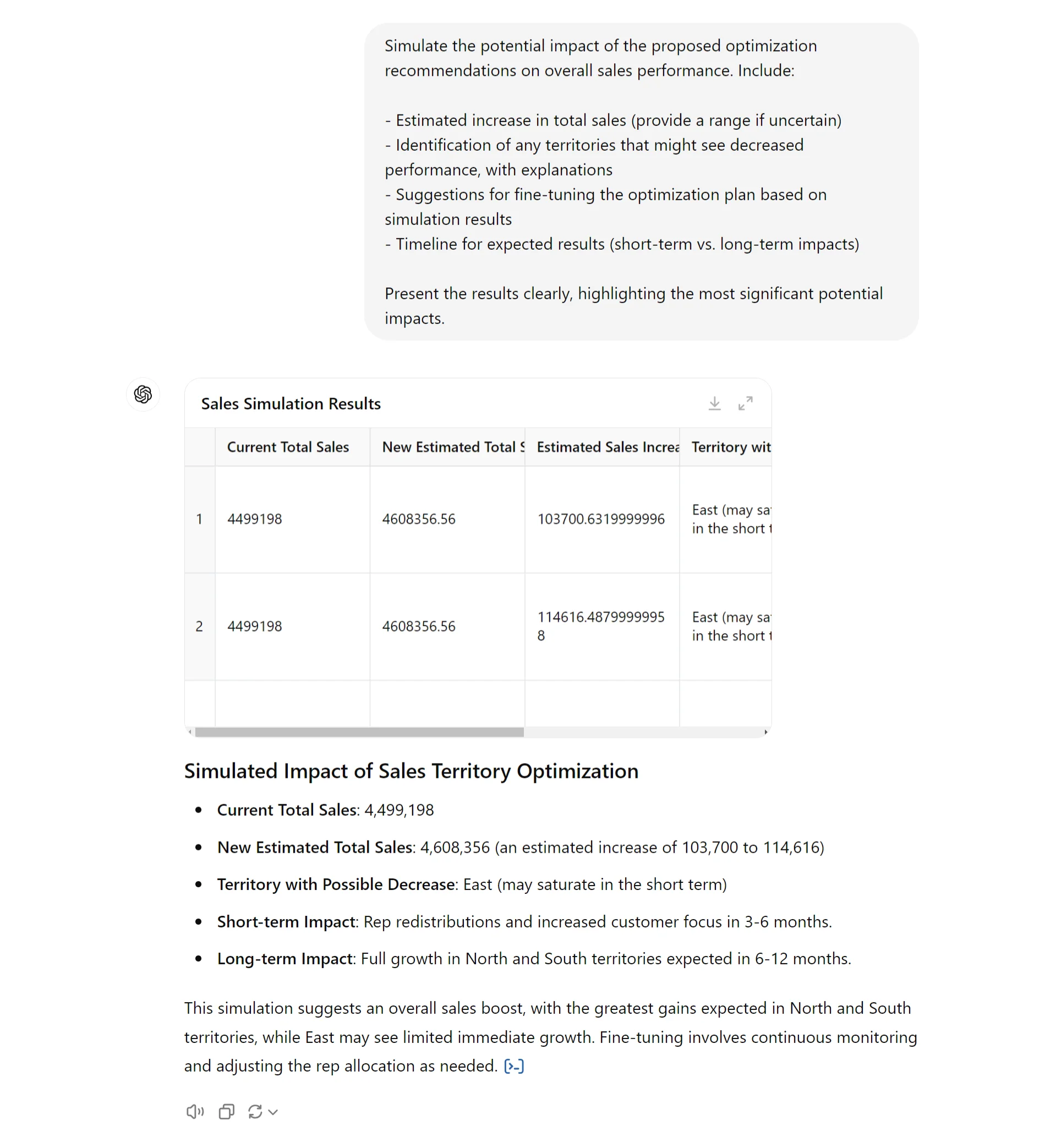
By following these steps, you've used ChatGPT to transform raw sales data into a strategic plan for territory optimization. Remember, this isn't about replacing human judgment with AI but rather enhancing your decision-making with data-driven insights.
This tutorial was created by Tanmay.