Using ChatGPT for keyword research
How to generate and refine targeted keyword ideas with ChatGPT.
2024-12-06
Welcome to the second tutorial in our SEO course. In this tutorial, we’ll focus on keyword research, exploring why keywords are important in SEO, and how to use ChatGPT to generate and refine keyword ideas.
Understanding keyword importance in SEO
Keywords are the foundation of SEO. They are the terms and phrases that users enter into search engines to find information, products, or services. By targeting the right keywords, you can ensure your content appears in search results for relevant queries, driving organic traffic to your site.
Why Keywords Matter:
- Search Visibility: Keywords help search engines understand what your content is about and match it with user queries.
- Targeted Traffic: By using relevant keywords, you attract visitors who are specifically looking for what you offer, increasing the chances of conversions.
- Content Relevance: Keywords guide your content creation, ensuring you address the topics and questions your audience cares about.
- Competitive Advantage: Effective keyword research helps you identify opportunities where you can outperform competitors in search rankings.
Using ChatGPT to generate keyword ideas
Now that you have an understanding of the importance of keywords, let’s get to work with ChatGPT to develop our keyword research process. To start, in ChatGPT, create a list of keywords for a broad topic or seed keyword related to your niche. For example, if your website is about fitness, you might start with “workout routines.”
Sample prompt:
Generate a list of keyword ideas related to "[keyword]."
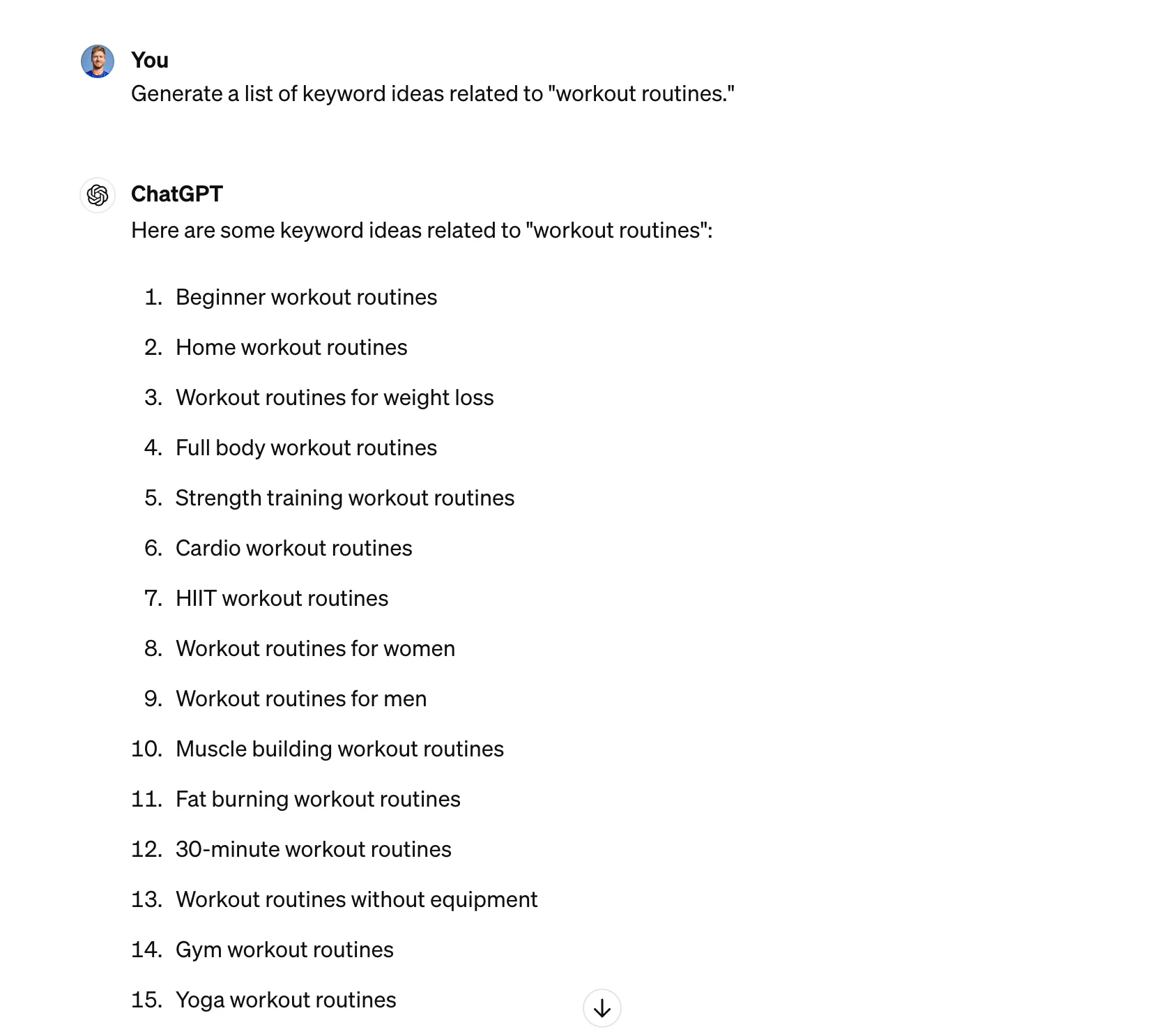
From there, ChatGPT can help you expand on initial ideas by suggesting related keywords and phrases. This can include long-tail keywords, which are lengthier and more specific keyword phrases that are less competitive and often more targeted.
Sample prompt:
Provide long-tail keyword ideas for "[keyword]."
.webp)
In addition, you can ask ChatGPT to suggest keywords based on current trends or seasonal variations to keep your keyword strategy up-to-date.
Sample prompt:
Suggest keyword ideas for "[keyword]" based on current [specify niche] trends.
.webp)
Refining keywords with ChatGPT
Once you have a list of potential keywords, the next step is refining them to ensure they align with your SEO goals and audience intent.
Understanding the intent behind each keyword is crucial. This ensures the keywords you’re targeting align with your planned outcomes. To do this, ask ChatGPT to categorize your keywords based on user intent, such as informational, navigational, transactional, or commercial investigation.
Sample prompt:
Categorize the following keywords by user intent: "[keyword 1]," "[keyword 2]," "[keyword 3]," "[keyword 4]."
.webp)
In addition to understanding the intent behind your keywords, it’s helpful to focus on less competitive keywords. Why? Because high-competition keywords can be challenging to rank for in search engines. You can use ChatGPT to identify keywords with moderate competition that still have a good search volume.
Sample prompt:
Suggest keywords related to "[keyword]" with moderate competition and good search volume.
.webp)
Once you have a set of keywords to focus on, you can generate variations of them to capture even more search traffic. To do this, ask ChatGPT to provide synonyms and related phrases to expand your set of possible keywords.
Sample prompt:
Provide variations and synonyms for the keyword "workout routines."
.webp)
Nicely done. If you’ve made it this far, you’ve generated and refined a list of targeted keywords that will help improve your search engine rankings and drive relevant traffic to your website.
Now it’s time to put these keywords to work.
In the next tutorial, we’ll explore how to create SEO-optimized website content using ChatGPT, ensuring your articles, blogs, and website copy resonate with your audience and rank well in search results.
This tutorial was created by Garrett.